
Setting Q3D Extractor Options
To set Q3D Extractor options in Electronics Desktop:
- Click Tools > Options > General Options.
The Options window appears, displaying General options.
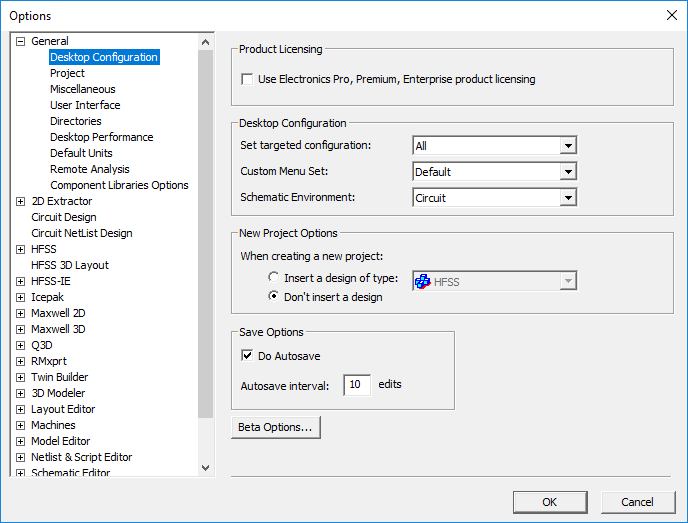
- In the left pane, expand Q3D.
The Q3D options expand. The Q3D Extractor General options display by default.
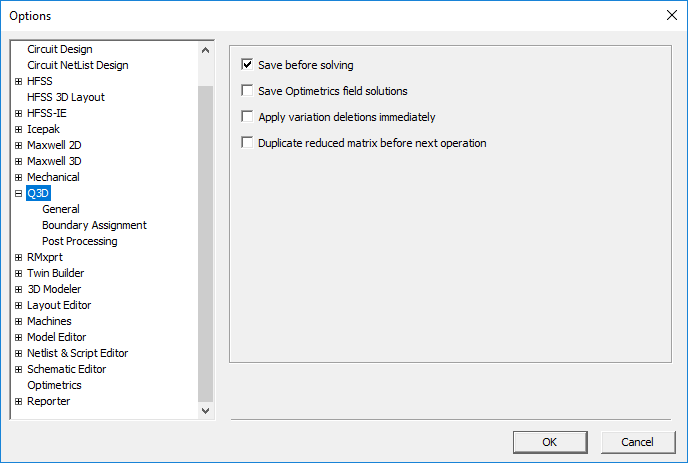
Use the tree in the left pane to select a group of options.
In Q3D Extractor General options, you can set the following:
- Save before solving – forces a full save before running the solver. If a simulation is started while another is running, you will be asked if you want solve without saving first. You can run multiple simulations, and if you have not edited the project in between solutions, crash recovery will work. In any case, you can start a new solve while running another without having to abort the current simulation.
- Save Optimetrics field solutions – when enabled, saves the field solution data for every solved design variation.
- Apply variation deletions immediately – select to save disk space.
- Duplicate reduced matrix before next operation – enables duplicating reduced matrices. See: Reduced Matrices.
In Q3D Extractor Boundary Assignment options, you can set the following:
- Duplicate conductors/mesh operations with geometry – when enabled, conductors are copied along with the geometry.
- Visualize Net Geometries – when enabled, net geometries are visible.
In Q3D Extractor Post Processing options, select a Default matrix sort order of either Ascending alphanumeric or User specified (default to creation order).