
Assigning Terminals (Sources and Sinks)
You can assign sources and sinks to any 2D or 3D object.
If you want to generate a capacitance solution, you do not need to assign any sources or sinks. However, for resistive or inductive solutions, any net that you want to include in the inductance/resistance matrix solution must have a single sink defined, along with at least one source.
Before assigning either a source or a sink, you must select a face of the 3D object or select a 2D object that is touching a 3D object.
A whole face of a 3D object must be chosen to apply an excitation. You cannot cut or use boolean operations to split a planar face of a body into multiple pieces and set the excitation on one piece(s). If an excitation should be applied to part of a larger plane face, a 2D sheet body of the needed size can be created and the excitation can be applied to that body. It is necessary for an excitation to be on a complete face or sheet body to ensure the mesh outlines are correct.
To assign a source or sink to an object:
- Perform one of the following actions:
- In the Modeling Workspace, right-click an object and select Assign Excitation > [Source/Sink].
- In the Project Manager, right-click an object and select Assign > [Source/Sink].
- Select an object and click Q3D Extractor > Nets > Assign Excitation > [Source/Sink].
A dialog box prompts you to name the source/sink.
- Enter a name for the source/sink.
- Click OK.
To assign a source or sink from a list of objects:
- Access the Assign Terminals from List dialog box one of two ways:
- Select Q3D Extractor > Nets > Assign Terminals from List.
- In the Project Manager, right-click Nets and select Assign Terminals from List.
The Assign Terminals from List dialog box appears.
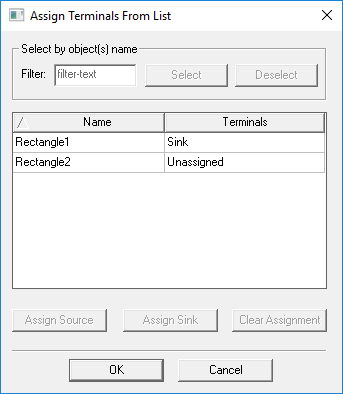
- Select an object.
You can also use the Filter field to search for objects by regular expression.
- Use the Terminals drop-down menu to assign either Source or Sink. Click Clear Assignment to remove a Source or Sink and return the object to Unassigned state.
- Click OK.