
Ansys Electronics Desktop History Tree
The history tree in the 3D Modeler window lists the active model's structure and grid details.
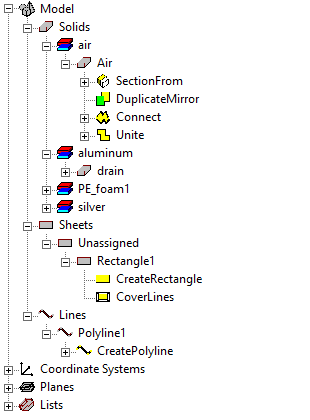
Expand or collapse items in the tree using the + and - boxes.
Expand or collapse all items in a category by right-clicking to open a shortcut menu:
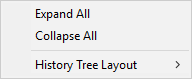
Some objects have more extensive shortcut menus than others, but all of them have these three options.
Selecting any item in the History Tree also selects it in the design area and populates the Properties window with its properties.
You can perform the following tasks with the History Tree:
- Organize the History Tree
- Control the View of Objects in the History Tree
- Use Group Commands for Modeler Objects
- Select Objects in the History Tree
- View and Edit Commands on History Tree Objects
The History Tree can contain the following model details:
|
Invalid |
Lists all invalid objects. |
|
3D Component Names |
Lists any 3D components added to the design. The History Tree lists their Solids, Coordinate Systems, and Planes separately from objects drawn in the modeler or imported to the modeler. |
|
Solids |
Lists the model's solid objects and a history of the commands carried out on each object. |
|
Sheets |
Lists the sheets in the model 3D design area. |
|
Lines |
Lists all line objects included in the active model. See Drawing a Straight Line for information on how to draw a line object. |
|
Points |
Lists all point objects included in the active model. See Drawing a Point for information on how to draw a point object. |
| Groups | Lists folders for Groups you have created or imported. See Group Commands for Modeler Objects. |
|
Coordinate Systems |
Lists all the coordinate systems for the active model. See Setting Coordinate Systems for more information on this model detail. |
|
Planes |
Lists the planes for all the coordinate systems. When you create a coordinate system, default planes are created on its xy, yz, and xz planes. |
|
Lists |
Lists the object or face lists for the active model. By default, a list called “AllObjects” appears. You can add a specific group of objects or surfaces for field plot or for calculation. See: Creating an Object List and Creating a Face List. |
While objects
created in