
User-Defined Documents: Python Script API
A User-Defined Documents (UDD) extension is implemented
as an IronPython script that defines a class with a specific name: UDDExtension,
which derives from a specific base class IUDDPluginExtension
and implements its abstract methods.
Import Statements
The base class to be used and the types it uses in turn are contained in .NET assemblies. The use of these requires that the assemblies be imported into the UDD script: the following import statements should be added to the top of the python script:
from Ansys.Ansoft.DocGeneratorPluginDotNet.DocGenerator.API.Data import *
from Ansys.Ansoft.DocGeneratorPluginDotNet.DocGenerator.API.Interfaces import *
UDDExtension Class
The UDD itself should be implemented as an IronPython
class called UDDExtension which must derive from the IUDDPluginExtension
abstract base class (from the Ansys.Ansoft.DocGeneratorPluginDotNet.DocGenerator.API.Interfaces
namespace).
Note that power users could derive a class hierarchy
tuned toward a specific type of UDDs and that they can derive from their
own base classes. The only requirement is that directly or indirectly,
the UDD class must derive from IUDDPluginExtension.
Example:
def BaseClassUDD ((IUDDPluginExtension):
#base class implementation
…
def UDDExtension ((BaseClassUDD):
#UDD class implementation
…
IUDDPluginExtension Abstract Class
Required functions:
The IUDDPluginExtension abstract class declares
the following abstract methods that must be implemented in the UDDExtension
class or one of its base classes. Not implementing any of these methods
will result in a run-time error and a non functioning UDD.
GetUDDName()
: Returns a string that is used as a prefix for all solution instances
created using this UDD.
Example:
def GetUDDName(self):
return "MinMaxAvg
GetUDDDescription() : Returns a description for the UDD, its purpose etc.
Example:
def GetUDDDescription(self):
return "Sample UDD"
ShowDefaultSetupDialog()
: Returns True if the default dialog is to be shown. Returns False if
the user does not want the default dialog box. In this case the user might
want to implement/show a customized setup dialog.
Example:
def ShowDefaultSetupDialog(self):
return True
GetUDDInputParams(List<UDDInputParams>
uddInputs)
: Returns the list of inputs parameters for
the User-Defined Document. Returns True on success, False on
failure.
The supplied input parameters are used to populate details of the parameters to which the UDD user will specify value and to specify the input names and their types.
uddInputs: .NET
list of UDDInputParams objects. The UDD script is expected to add one
instance of UDDInputParams for each input definition it wants displayed.
When creating the UDD, the user will assign a matching value to
each such input.
Example:
def GetUDDInputParams(self, uddInputs)
# Boolean input
param1 = UDDInputParams("Summary","Display Summary", Constants.kBoolTypeStr, True)
uddInputs.Add(param1)
# Text input
param2 = UDDInputParams("Name","User Name", Constants.kTextTypeStr , "Sita Ramesh")
uddInputs.Add(param2)
# Number input
param3 = UDDInputParams("Version","Script Version", Constants.kNumberTypeStr, 1021)
uddInputs.Add(param3)
# Solution input
param5 = UDDInputParams("DLMetrics","Data Line Metrics",Constants.kSolutionTypeStr)
uddInputs.Add(param4)
# Trace input
param5 = UDDInputParams("DQ0","DQ0",Constants.kTraceTypeStr)
uddInputs.Add(param5)
return True
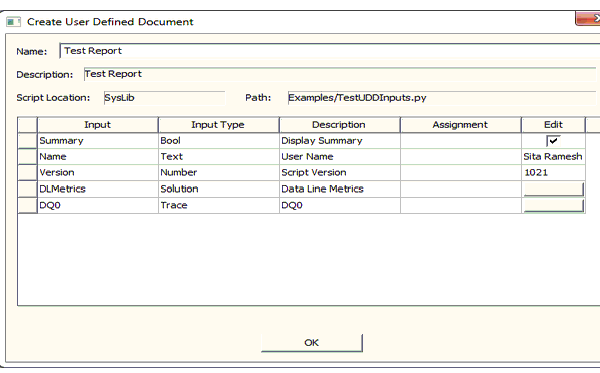
Based on the input params, the following dialog is displayed when you click Reports > Create Document. The name and description of the UDD are also displayed in this dialog.
Generate(List<UDDInputData> uddInputs, IUDDGenerator
generator, IProgressMonitor progressMonitor)
: This is the
main method that accesses the data from the uddInputs and generates
the document.
uddInputs: The list
of inputs that the user setup in the dialog box. They are now available to
query for data.
generator: This
is the document generator object which we use to create different elements
of the document like titles, sections, tables, images and write the data
too. This interface is explained in the Document Generator Interface
document.
progressMonitor
: IProgressMonitor object. This can be used to set progress for long
running calculations, check for user initiated abort, etc.
Example:
def Generate(self, input, docgen, progMon):
# Gather data from inputs
boolinput = input[0].Data()
textinput = input[1].Data()
dblinput = input[2].Data()
# Get document root
docroot = docgen.GetDocumentRoot()
# Add Section
section1 = docroot.AddSection("Summary", "Overall Results ")
# Add a table
table1 = section1.AddTable("Test Summary")
#Add a table group with 2 columns
tgroup1 = table1.AddTableGroup(2)
# get desktop application
oApp = self.GetUDDAppContext()
if oApp != None:
oDesktop = oApp.GetAppDesktop()
if oDesktop != None:
# version number
version = oDesktop.GetVersion()
text1 = tgroup1.AddContent()
text1 .Add(0, "Product Version")
text1 .Add(1, version)
oProject = oDesktop.GetActiveProject()
if oProject != None:
projectname= oProject.GetName()
text1 = tgroup1.AddContent()
text1 .Add(0, "Project")
text1 1.Add(1, projectname)
oDesign = self.GetUDDDesignContext()
if oDesign != None:
designname = oDesign.GetName()
text1 = tgroup1.AddContent()
text1 .Add(0, "Design")
text1 .Add(1, designname)
# Provides a script path
scriptpath = docgen.GetScriptPath()
text1 = tgroup1.AddContent()
text1 .Add(0, "Script Path")
text1 .Add(1, scriptpath )
#Provides the script version
text1 = tgroup1.AddContent()
text1 .Add(0, "Script Version")
text1 .Add(1, str(dblinput ))
#Provides the output xml path
outputpath = docgen.GetOutputFilePath()
text1 = tgroup1.AddContent()
text1 .Add(0, "Output Path")
text1 .Add(1, outputpath )
#Provides the user information
text1 = tgroup1.AddContent()
text1 .Add(0, "User")
text1 .Add(1, textinput)
# Generate Xml output
docgen.Write(False)
# Generate Html output
docgen.WriteHTML()
# Generate PDF output
docgen.WritePDF()
return True
Optional Functions:
SetupUDDInputParams(List<UDDInputParams>
uddInputs)
: Displays a customized dialog and returns the
user choices for the input params.
uddInputs- .NET
list of UDDInputParams objects with values for each of them. These can
be the user choice for each input obtained through a custom dialog or
some other non graphical assignment.
We cannot process trace and solution types of input with a custom dialog because there is no way of assigning solution data to the input without the invocation of the reporter dialog.
Example:
def SetupUDDInputParams(self, uddInputs)
udddialog = BaseExampleUDDDialog()
if udddialog.ShowDialog() == Forms.DialogResult.OK:
# Boolean input
param1 = udddialog.GetInput("Summary")
uddInputs.Add(param1)
# Text input
param2 = udddialog.GetInput("Name")
uddInputs.Add(param2)
# Number input
param3 = udddialog.GetInput("Version")
uddInputs.Add(param3)
HandleUDDEvents(List<string>
eventTags)
: The tags associated with the event is received
by plugin using this abstract class.
This method is the event handler for all link events
set by the SetEventLink() method on a IUDDText. Refer to the definition
of the IUDDText object in the Document Generator Interface document.
Example:
def HandleUDDEvents(self, uddLinks):
if uddLinks[0] == "Open" Report":
# Get Design Name
oDesign = self.GetUDDDesignContext()
if oDesign != None:
oDesign.OpenReport(uddLinks[1])
return True
GetUDDSchema() :
Returns the file path of the schema to validate the xml. This will override
the default schema used. It returns a string containing the full file path
of the schema.
def GetUDDSchema(self):
return "C:\\Program Files\\Ansoft\\Designer8.0\\Windows\\common\\docbook\\schema\\xsd\\docbook.xsd"
GetUDDStyleSheetForHtml()
: Returns the file path of the stylesheet used to generate the html
document. This will override the default stylesheet for html. It returns
a string containing the full file path of the stylesheet.
def GetUDDStyleSheetForHtml(self):
return "C:\\Program Files\\Ansoft\\Designer8.0\\Windows\\common\\docbook\\"
GetUDDStyleSheetForPdf() :
Returns the file path of the stylesheet used to generate the pdf document.
This will override the default stylesheet for pdf. Returns string containing
the full file path of the stylesheet.
Example:
def GetUDDStyleSheetForPdf(self):
return "C:\\Program Files\\Ansoft\\Designer8.0\\Windows\\common\\docbook\\xsl\\fo\\docbook.xsl"
GetFopExecutable(): Returns the file path of the fop executable used to generate the pdf
document. This will override the default stylesheet for pdf. It returns
a string containing the full file path of the fop executable.
Example:
def GetFopExecutable(self):
return "C:\\Program Files\\Ansoft\\Designer8.0\\Windows\\common\\ApacheFOP\\fop-1.0\\fop"
GetUDDAppContext():
Returns the UDD Owner (if set). This is a Dispatch wrapper that is essentially
a COM IDispatch implementation and corresponds to the IDispatch pointing
to the desktop app.
GetUDDDesignContext():
Returns the UDD Owner (if set). This is a Dispatch wrapper that is essentially
a COM IDispatch implementation and corresponds to the IDispatch pointing
to the design.