
Defining the Stator Pole for a PMDC Motor
The rotor pole drives the electromagnetic field which is coupled with the stator windings. Use the Stator Pole Data Properties window to define the stator pole.
To define the rotor pole:
- To open the Stator Pole Data Properties window, double-click the Machine-Stator-Pole entry in the project tree on the desktop. (You can also enter values in the Properties section of the desktop without opening a separate window.)
- Enter the ratio of the actual arc distance
in relation to the maximum possible arc distance in the Embrace field. This value is between
0 and 1.
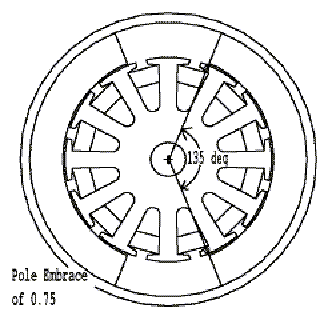
- Enter the distance from the center of the stator to the magnet arc center in the Offset field. Enter 0 for a uniform air gap.
- To select the type of magnet to use in the rotor pole:
- Click the Magnet
Type button.
The Select Definition window appears. - Select or define a material for the magnet type.
- Click OK to close the Select Definition window and return to the Properties window.
- Enter the length of the magnet in the axial direction in the Magnet Length field.
- Enter the maximum radial thickness of the magnet at the center of the pole in the Magnet Thickness field. To control the flux, the magnet’s thickness may vary.
- Click OK to close the Properties window.
Note: For a two-pole
machine, a pole embrace of 0.75 yields a magnet with a span of 135 degrees
(based on 0.75*180 degrees).