
Creating Two Hairpin Coils Connected with End-Tip and Leads
-
Set Slots=18, Layers=6, CoilPitch=2, 2ndPitch=3, LayerSetIdx=0, and InfoCoil=4. These parameter settings will create a single hairpin coil located at the slot bottom, as shown by the pink-color coil in the figure below.
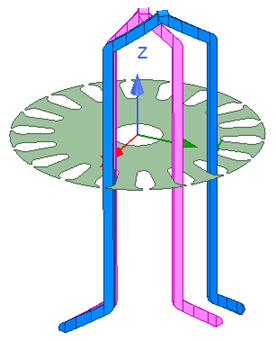
Two hairpin coils with different coil pitch at different slot locations
- Make a copy of the coil, and change CoilPitch to 3, and LayerSetIdx to 1. The copied coil is modified to be located at the slot center, as shown by the blue-color coil in the above figure.
-
Rotate the blue-color coil by 100deg, or 5 slot-angle, the bottom leg-span of the blue-color coil will align with the top leg-span of the pink-color coil, as shown in the figure below.
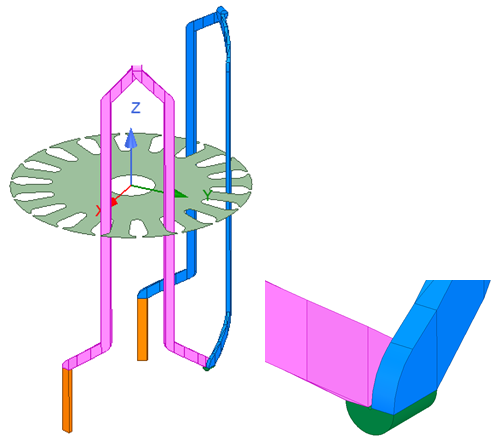
Two hairpin coils at different slot locations connected with end-tip and leads
- Make a copy of the blue-color coil, and change LayerSetIdx to 0.5 (for end-tip between layer-set index of 0 and 1) and InfoCoil to 4. The copied coil is modified to an end tip, as shown by the green-color object in the above figure.
- Make a copy of the pink-color coil and change InfoCoil to 6, the copied coil is modified to a going lead; and make a copy of the blue-color coil and change InfoCoil to 7. The copied coil is modified to a returning lead, as shown by the golden-color objects in the figure.
The two hairpin coils, two leads, and one end-tip can thus be united to become a single connected coil set.