
Data Center Components - Tile
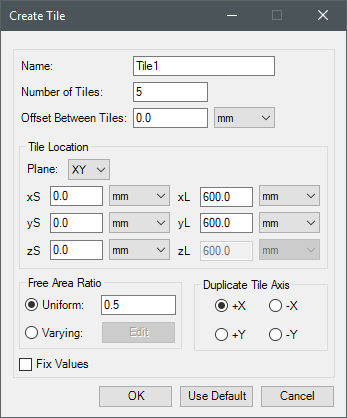
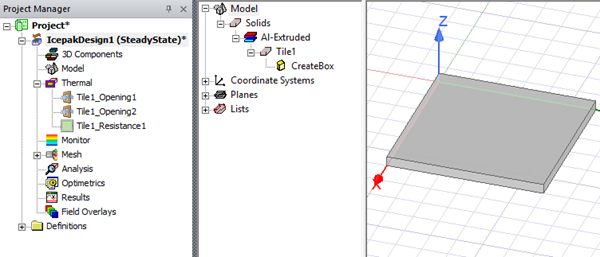
Tile enables you to create geometry and boundary conditions to represent a tile.
|
Name |
The Name appears in the Project Manager window, history tree, and 3D Modeler window. |
| Number of Tiles | Number of Tiles specifies the number of tiles to create. |
| Tile Location | Under Tile Location, specify the plane on which to create the tiles. Also, enter the x, y, and z start and length location to define the object's size. |
| Free Area Ratio | Free Area Ratio specifies whether the tiles have the same free area ratio or varying ratios. See Specifying Varying Free Area Ratios below for more information on specifying varying ratios. |
| Duplicate Tile Axis | Duplicate Tile Axis specifies the direction along which additional tiles are aligned. |
Specifying Varying Free Area Ratios
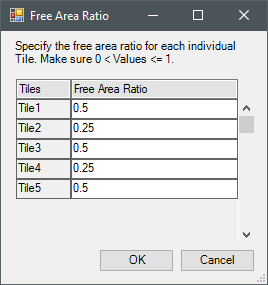
When Varying is enabled, click Edit to open the Free Area Ratio dialog box. For each tile listed, enter a value to define its free area ratio.
Iron Python Script – TILE.py:
The following is the toolkit's scripting information.
### Script for UNIFORM Free Area Ratio
scriptInput = ["ng"]
scriptInput.append("Name:Tile1")
scriptInput.append("length_unit:meter")
scriptInput.append("Number:1")
scriptInput.append("Offset:0.0")
scriptInput.append("Plane:XY")
scriptInput.append("xS:0.0")
scriptInput.append("yS:0.0")
scriptInput.append("zS:0.0")
scriptInput.append("xL:0.6")
scriptInput.append("yL:0.6")
scriptInput.append("zL:0.6")
scriptInput.append("FreeAreaRatioType:Uniform")
scriptInput.append("FreeAreaRatio:0.5")
scriptInput.append("DuplicateTileAxis:+X")
oDesign.RunToolkit("SysLib", "Geometry/Data Center Components/Tile", [])
oDesign.RunToolkit("SysLib", "Geometry/Data Center Components/Tile", ["ng"])
oDesign.RunToolkit("SysLib", "Geometry/Data Center Components/Tile", scriptInput)
### Script for VARYING Free Area Ratio
scriptInput = ["ng"]
scriptInput.append("Name:Tile1")
scriptInput.append("length_unit:meter")
scriptInput.append("Number:3")
scriptInput.append("Offset:0.0")
scriptInput.append("Plane:ZX")
scriptInput.append("xS:0.0")
scriptInput.append("yS:0.0")
scriptInput.append("zS:0.0")
scriptInput.append("xL:0.6")
scriptInput.append("yL:0.6")
scriptInput.append("zL:0.6")
scriptInput.append("FreeAreaRatioType:Varying")
scriptInput.append("FreeAreaRatio:0.5,0.4,0.3")
scriptInput.append("DuplicateTileAxis:-X")
oDesign.RunToolkit("SysLib", "Geometry/Data Center Components/Tile", [])
oDesign.RunToolkit("SysLib", "Geometry/Data Center Components/Tile", ["ng"])
oDesign.RunToolkit("SysLib", "Geometry/Data Center Components/Tile", scriptInput)