
DTM - Thermostat for Source Control
Thermostat for Source Control enables you to define temperature-dependent power in transient designs for selected 2D source geometry (sheets) by specifying trigger temperatures and power factors.
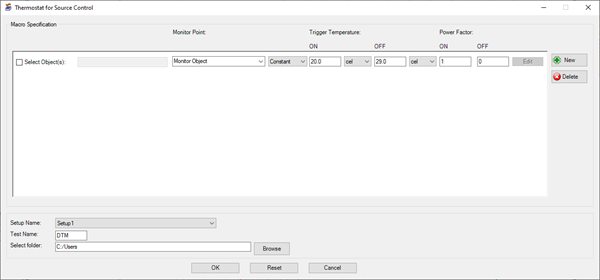
| New/Delete | Click New to add a row to define temperature-dependent source geometry. Click Delete to remove a row. |
| Selected Object(s) | Enable Selected Object(s) to open the Select Object(s) dialog box and select the source(s) for which you want to define temperature-dependent power. |
| Monitor Point | Under Monitor Point, select one or more pieces of solid object geometry, point geometries, or monitor points. The source power is regulated based on the selected item's temperature. If two or more items are selected, the source power is regulated based on the maximum temperature value of all selected points. |
| Trigger Temperature | Under Trigger Temperature, enter the ON and OFF trigger temperatures. When the objects' temperature is between the specified temperatures, the associated power factor is applied. |
| Power Factor | Under Power Factor, enter the ON and OFF power factors to be applied to the selected objects' power when the objects' temperature is between the specified trigger temperatures. |
| Setup Name | In the Setup Name drop-down list, select the Icepak solve setup. |
| Test Name | In the Test Name field, enter a file name for the control program script. |
| Select folder | Click Browse to select a folder in which to save the control program script. |