
Data Center Components - Rack (Recirc)
Rack (Recirc) enables you to create geometry and boundary conditions to represent a rack. For Type:
-
Rack (Front to Top) should be chosen when flow enters from the front face and leaves from the top face of the rack.
-
Rack (Front to Rear) should be chosen when flow enters from one face and leaves from the other face in the same direction.
Use the navigation arrows on the image below to view each tab.
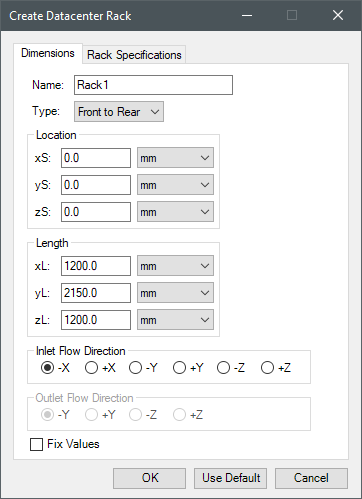
|
Name |
The Name appears in the Project Manager window, history tree, and 3D Modeler window. |
| Type | Type specifies the rack type. Front to Rear specifies that air flows in a linear fashion from the inlet and outlet. Front to Top requires the specification of the Outlet Flow Direction. |
|
Location Length |
Under Location, specify the x, y, and z start and length location to define the object's size. |
| Inlet Flow Direction | Inlet Flow Direction specifies the direction air flows into the rack. |
| Outlet Flow Direction | When Front to Top is selected, Outlet Flow Direction specifies the direction flows out of the rack. |
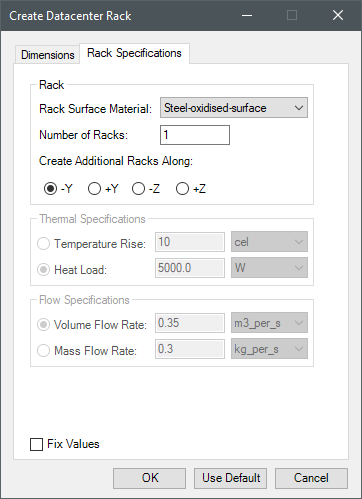
|
Rack |
Under Rack, specify the surface material, the number or racks to create, and the direction along which to create additional racks (if more than one rack is specified). |
| Thermal Specifications | Under Thermal Specifications, specify the rack's thermal properties as Temperature Rise or Heat Load. |
|
Flow Specifications |
Under Flow Specifications, specify the rack's fluid properties as Volume Flow Rate or Mass Flow Rate. |

Iron Python Script – Rack (Recirc).py:
The following is the toolkit's scripting information.
scriptInput = ["ng"]
scriptInput.append("Name:Rack1")
scriptInput.append("Type:Front to Top")
scriptInput.append("length_unit:meter")
scriptInput.append("temp_unit:cel")
scriptInput.append("heat_unit:W")
scriptInput.append("VFR_unit:m3_per_s")
scriptInput.append("MFR_unit:kg_per_s")
scriptInput.append("xS:0.0")
scriptInput.append("yS:0.0")
scriptInput.append("zS:0.0")
scriptInput.append("xL:1.2")
scriptInput.append("yL:2.15")
scriptInput.append("zL:1.2")
scriptInput.append("InletDirection:-X")
scriptInput.append("OutletDirection:-Y")
scriptInput.append("ThermalSpec:HeatLoad")
scriptInput.append("FlowSpec:VolumeFlowRate")
scriptInput.append("TemperatureRise:10")
scriptInput.append("HeatLoad:5000.0")
scriptInput.append("VFR:0.35")
scriptInput.append("MFR:0.3")
scriptInput.append("Material:Steel-oxidised-surface")
scriptInput.append("Num:2")
scriptInput.append("DuplicationLine:-Y")
oDesign.RunToolkit("SysLib", "Geometry/Data Center Components/Rack (Recirc)", [])
oDesign.RunToolkit("SysLib", "Geometry/Data Center Components/Rack (Recirc)", ["ng"])
oDesign.RunToolkit("SysLib", "Geometry/Data Center Components/Rack (Recirc)",
scriptInput)