
IC Packages - JEDEC
JEDEC enables you to quickly set up test chambers for IC package thermal characterization. You can analyze the thermal resistance under conditions of forced convection or natural convection.
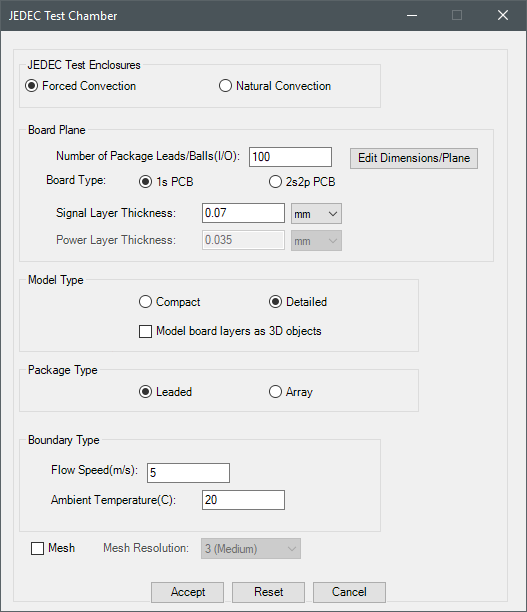
| JEDEC Test Enclosures | Under JEDEC Test Enclosures, specify the type of chamber, forced or natural convection. |
| Board Plane | Under Board Plane, specify the number of package leads/balls in the device that you are characterizing, board type, and thickness of the signal layer and power layer (2s2p PCB only). Also, to specify the package dimensions and plane, click Edit Dimensions/Plane to open the Edit Plane/Board Dimensions dialog box. |
| Model Type | Under Model Type, specify whether the model is compact or detailed. A compact board will be represented by a single thick plate regardless of how many layers it contains. The effect of copper layers is accounted for in the form of directional conductivities of the solid material assigned to the thick plate. A two-layer detailed board will be modeled by two thick plates representing the top (metal) trace layer and the plate with isotropic conductivity (dielectric) underneath the trace layer. A four-layer detailed board includes two additional thin conducting plates that are embedded inside the dielectric to represent two intermediate trace layers. Enable Model board layers as 3D objects to create box geometry for the board layers. |
| Package Type | Under Package Type, specify whether the package is leaded or array. |
| Boundary Type | Under Boundary Type, specify the speed of the flow (forced convection only) and temperature. |
| Mesh | Select Mesh to specify the Mesh Resolution and mesh the model when you click Accept. |
| Solve | Select Solve to analyze the model when you click Accept. |
| Accept, Reset, Cancel | Click Accept to create the test chamber. If you selected Mesh and Solve, the Electronics Desktop will generate a mesh and analyze the design, respectively. Click Reset to restore the default values. Click Cancel to close the dialog box without creating the test chamber. |
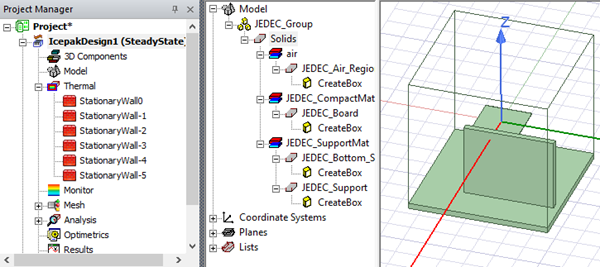
Iron Python Script – JEDEC.py:
The following is the toolkit's scripting information.
data = ["ng",
'length_unit:meter',
'xS:-0.00075',
'yS:-0.00075',
'zS:-0.00075',
'xL:0.015',
'yL:0.015',
'zL:0.015',
'plane:ZX'
'Test Enclosure Type:Natural Convection',
'Number of Package Leads/Balls:100',
'Board Type:1s PCB',
'Signal Layer Thickness:0.00007',
'Power Layer Thickness:0.000035',
'Model Plane:Detailed',
'Model board layers as 3D objects:False',
'Package Plane:Leaded',
'Flow Speed(m/s):5',
'Ambient Temperature(C):20',
'Mesh:No',
'Mesh Resolution:3',
'Solve:No'
]
oDesign.RunToolkit("SysLib", "Modeling/IC Packages/JEDEC", [])
oDesign.RunToolkit("SysLib", "Modeling/IC Packages/JEDEC", ["ng"])
oDesign.RunToolkit("SysLib", "Modeling/IC Packages/JEDEC", data)