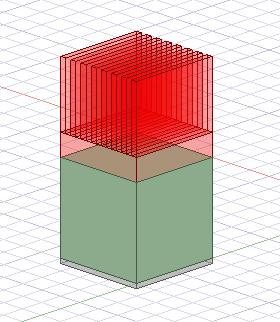
Heatsinks - Heatsink Creation
Heatsink Creation enables you to create one or more heatsinks on selected geometry.
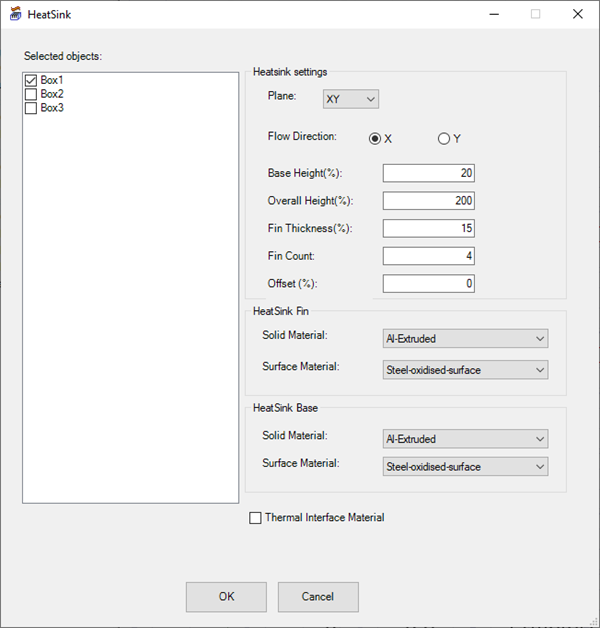
| Selected Objects |
Under Selected objects, select the geometry on which to place the heatsink(s). Note: Before opening the HeatSink toolkit, you can select geometry in the History tree to automatically select it in the HeatSink dialog box. |
| Heatsink Settings | |
| Plane | Plane specifies the plane on which to create the heatsink(s). |
| Flow Direction | Flow Direction specifies the direction in which the length of the fins run along the base of the heatsink, or the direction of the flow through the domain. |
| Base Height(%) | Base Height(%)specifies the height of the heatsink's base as a percentage of overall height. |
| Overall Height(%) | Overall Height(%) specifies the overall height as a percentage relative to the height of the geometry on which it is placed. |
| Fin Thickness(%) | Fin Thickness specifies the thickness of the fins as a percentage of the base width. |
| Fin Count | Fin Count specifies the number of fins on the heatsink. |
| Offset(%) | Offset(%) specifies the offset of the fins in the direction parallel to the base. |
| Heatsink Fin | |
| Solid Material | Solid Material specifies the material type of the heatsink fins using the drop-down list. |
| Surface Material | Surface Material specifies the material type of the external sides of the heatsink fins using the drop-down list. |
| Heatsink Base | |
| Solid Material | Solid Material specifies the material type of the heatsink base using the drop-down list. |
| Surface Material | Surface Material specifies the material type of the external sides of the heatsink base using the drop-down list. |
| Thermal Interface Material | Enable Thermal Interface Material to create a box between the heatsink and the selected box geometry. The Thermal Interface Material geometry is assigned Copper as its material. |