
Other - Create Network Representation Heat Exchanger
Create Network Representation Heat Exchanger enables you to create a flow-through or looped heat exchanger.
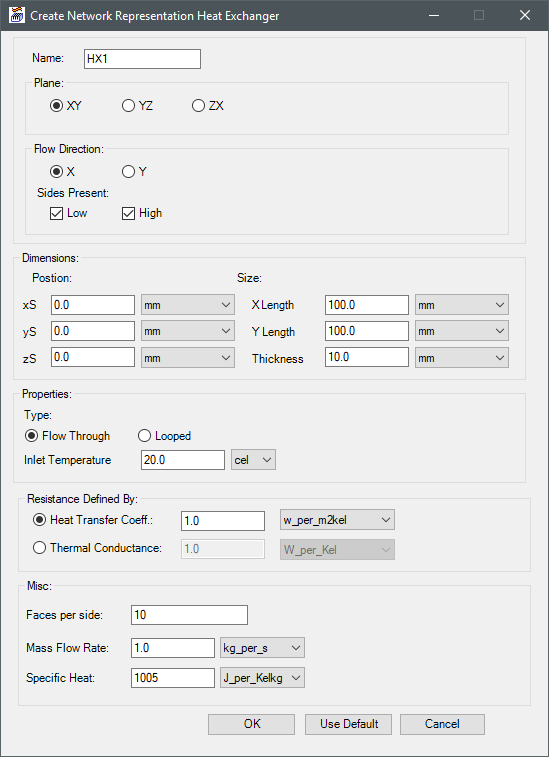
|
Name |
The Name appears in the Project Manager window, history tree, and 3D Modeler window. |
| Plane | Plane specifies the plane on which to create the heat exchanger. |
| Flow Direction | Under Flow Direction, specify the direction of the flow and which sides are present (low and/or high). |
| Dimensions | Under Dimensions, specify the x, y, and z coordinate locations and the length and thickness of the heat exchanger. |
| Properties | Under Properties, specify Flow Through or Looped. For flow through heat exchangers, specify the Inlet Temperature. For looped, specify the Ambient Temperature. |
| Resistance Defined By | Under Resistance Defined By, define resistance by specifying a heat transfer coefficient or thermal conductance. |
| Misc | Under Misc, specify the number of faces on each side and the Mass Flow Rate and Specific Heat. |
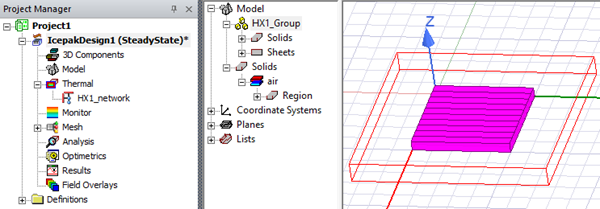
Iron Python Script – Network_Representation_Heat_Exchanger.py:
The following is the toolkit's scripting information.
data = ["ng",
'Length Unit:meter',
'Temperature Unit:cel',
'HTC Unit:w_per_m2kel',
'Thermal Conductance Unit:W_per_Kel',
'Mass Flow Unit:kg_per_s',
'Specific Heat Unit:J_per_Kelkg',
'Plane:XY',
'xS:0.0',
'yS:0.0',
'zS:0.0',
'Length1:0.1',
'Length2:0.1',
'Thickness:0.01',
'Flow Direction:1',
'Low Side Present:True',
'High Side Present:True',
'Type:Flow Through',
'Temperature:20.0',
'Resistance Defined By:HTC',
'HTC Value:1.0',
'Thermal Conductance Value:1.0',
'Faces per side:10',
'Mass Flow Rate:1.0',
'Specific Heat:1005'
]
oDesign.RunToolkit("SysLib", "Geometry/Other/Network_Representation_Heat_Exchanger", data)