
HTC Coefficient Calculator
HTC Coefficient Calculator enables you to calculate average heat transfer coefficients using well established correlations or user-defined correlations. After the heat transfer coefficient is computed, you can apply it to the selected model face. A wall thermal boundary condition is created with the heat transfer coefficient defined.
Note: In Linux, you must select faces before opening the toolkit in order to assign the wall boundary condition.
Note: In addition to status updates, the Messages window displays reference information related to the correlations used.
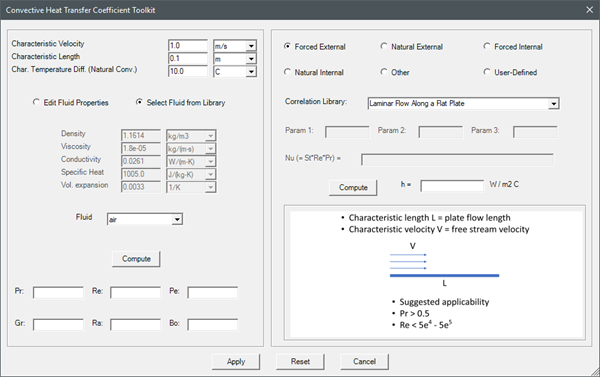
| Characteristic Values | The Characteristic values specify the velocity, length, and temperature difference (natural convection). |
| Fluid Properties | Select Edit Fluid Properties and manually enter the fluid specifications, or select a fluid from the project's material library in the Fluid drop-down list. |
| Dimensionless Numbers Calculator | Click Compute to calculate the dimensionsless numbers based on the fluid properties. |
| Flow Configuration | Select a flow configuration option to define the Correlation Library. |
| Correlation Library | The Correlation Library lists the correlations available for the selected flow configuration. The schematic displayed provides guidance on the suggested applicability of the correlation. Use the schematic to verify the characteristic length, velocity, and temperature. |
| Param 1, 2, 3 | If needed, specify any additional parameters in Param 1, Param 2, and Param 3 based on the selected correlation. |
| User-Defined Correlation | To define a custom correlation, select the User-Defined flow configuration and enter the correlation values in the enabled field. |
| Compute | Click Compute to calculate the heat transfer coefficient value. |
| Apply | Click Apply to assign the heat transfer coefficient to the selected model face. A wall thermal boundary condition is created with the heat transfer coefficient defined. |