
IC Packages - Extract JB JC
Extract JB JC enables you to extract Theta_JB and Theta_JC for a package.
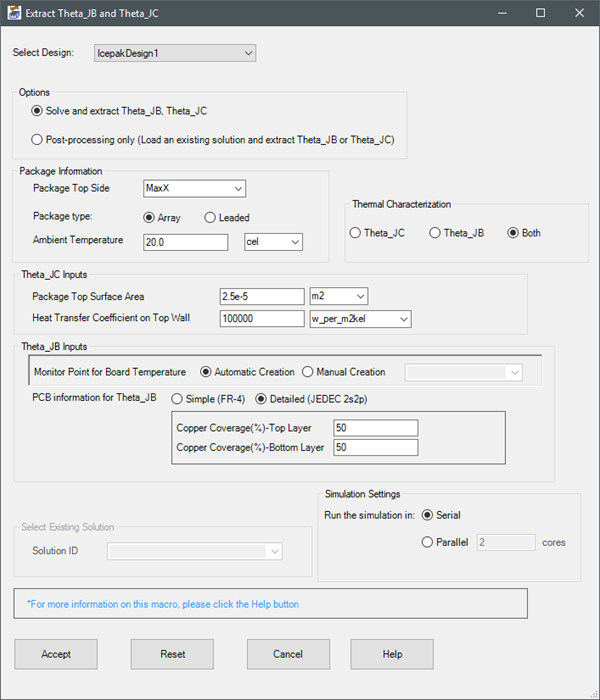
| Options | You can choose to run the simulation and perform the extraction or select an existing solution. |
| Package Information | Define the package top side, type, and ambient temperature. |
| Theta_JC Inputs | Define the package top surface area and heat transfer coefficient on the top wall. |
| Theta_JB Inputs | Define the monitor point creation method and PCB information (simple or detailed). For Detailed PCBs, define the copper coverage on the top and bottom layers. |
| Select Existing Solution | If you selected Post-processing only under Options, select the solution from the Solution ID drop-down list. |
| Simulation Settings | If you selected, Solve and extract Theta_JB and Theta_JC, choose wher to run the simulation in serial or parallel mode. For parallel simulations, specify the number of cores to use. |
| Accept | Click Accept to run the simulation and/or perform the extraction. |
| Reset | Click Reset to restore the default values. |
| Cancel | Click Cancel to close the dialog box. |
| Help | Click Help to display a text file with additional information and limitations regarding using the Extract_JB_JC toolkit. |
Iron Python Script – Extract_JB_JC.py:
The following is the toolkit's scripting information.
data = ["ng",
'designname:IcepakDesign1', 'Options:Solve', #Post for post processing 'topSide:MinX', 'packagetype:Array', #Other option is Leaded 'ambienttemp:20.0', 'ambienttempunit:cel', 'Type:ThetaJC', #Other options are ThetaJB,Both 'packagetsa:2.5e-5', 'packagetsaunit:m2' 'htcwall:10000', 'htcwallunit:w_per_m2kel', 'Monitorpoint:Automatic', #Other option is Manual 'pcb_info:Detailed', #Other option is Simple 'toppercent:50', 'bottompercent:50', 'Solvesetting:Serial', #Other options is Parallel 'cores:2', 'setupname:Setup1', 'Monitorpoint:Point1' ]