
Packages - Network Model - Delphi_QFP_Network
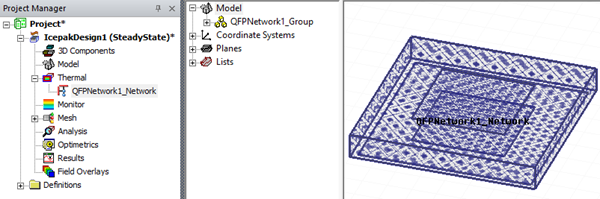
Packages - Network Model - Delphi_QFP_Network enables you to create geometry and boundary conditions to represent a Delphi quad flat package network.
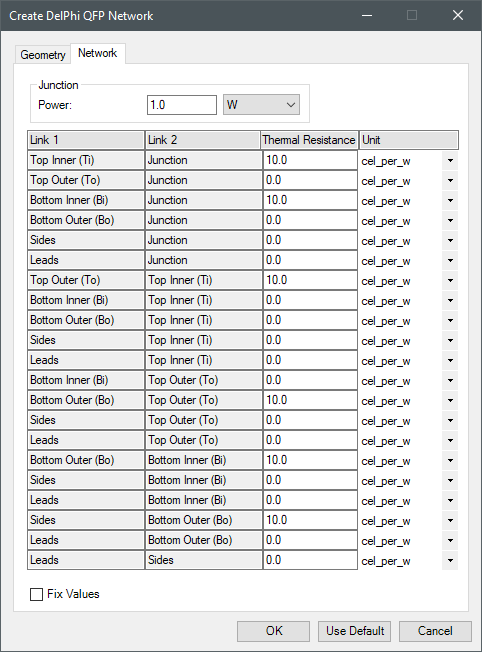
Use the navigation arrows on the image below to view each tab.
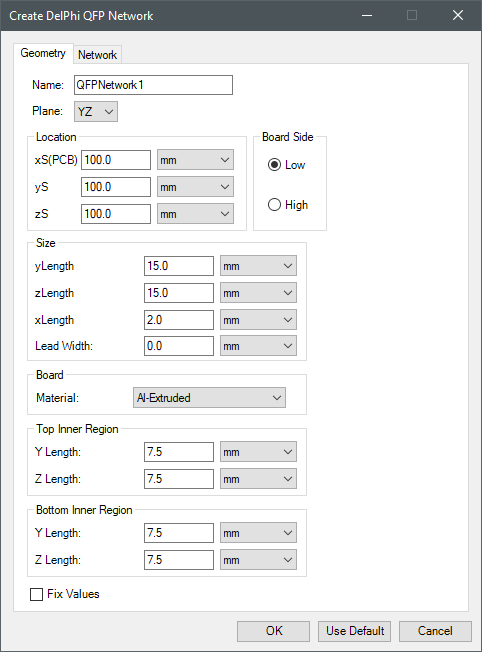
| Name | The Name appears in the Project Manager window, history tree, and 3D Modeler window. |
| Plane | Plane specifies the plane on which to create the package. |
| Location | Under Location, specify the starting coordinates for the package geometry relative to center of the 3D Modeler. |
| Board Side | Under Board Side, specify which side of the package the board is located and the lead width. |
| Size | Under Size, specify the length of the package and leads in each coordinate direction. |
| Board | Under Board, select the board material. |
| Top Inner Region | Under Top Inner Region, specify the length of the inner region on the top side of the package. |
| Bottom Inner Region | Under Bottom Inner Region, specify the length of the inner region on the bottom side of the package. |
Iron Python Script – Delphi_QFP_Network.py:
The following is the toolkit's scripting information.
scriptInput = ["ng"]
scriptInput.append("Name:QFPNetworkA")
scriptInput.append("Plane:XY")
scriptInput.append("length_unit:meter")
scriptInput.append("power_unit:W")
scriptInput.append("resistance_unit:cel_per_w")
scriptInput.append("xS:0.1")
scriptInput.append("yS:0.1")
scriptInput.append("zS:0.1")
scriptInput.append("BoardSide:Low")
scriptInput.append("Len1:0.015")
scriptInput.append("Len2:0.015")
scriptInput.append("Thick:0.002")
scriptInput.append("LeadWidth:0.001")
scriptInput.append("BoardMaterial:Al-Extruded")
scriptInput.append("TopLength1:0.0075")
scriptInput.append("TopLength2:0.0075")
scriptInput.append("BottomLength1:0.0075")
scriptInput.append("BottomLength2:0.0075")
scriptInput.append("JunctionPower:1.0")
scriptInput.append("Links:[10,0,10,0,0,0,0,0,10,0,0,0,0,10,0,0,0,0,10,0,0]")
oDesign.RunToolkit("SysLib", "Geometry/Packages - Network Models/Delphi_QFP_Network", [])
oDesign.RunToolkit("SysLib", "Geometry/Packages - Network Models/Delphi_QFP_Network", ["ng"])
oDesign.RunToolkit("SysLib", "Geometry/Packages - Network Models/Delphi_QFP_Network", scriptInput)