
Packages - DUAL
DUAL enables you to create geometry and boundary conditions to represent a DUAL package.
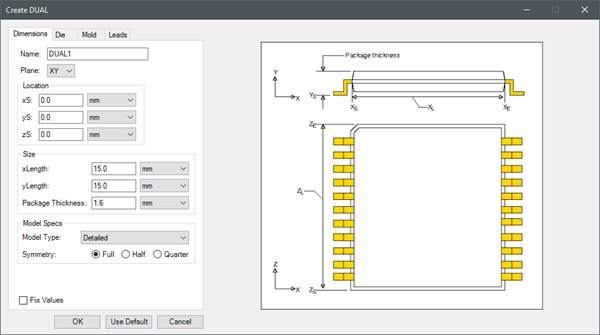
Use the navigation arrows on the image below to view each tab.
|
Name |
The Name appears in the Project Manager window, history tree, and 3D Modeler window. |
| Plane | Plane specifies the plane on which to create the package. |
| Location | Under Location, specify the starting coordinates for the package geometry relative to center of the 3D Modeler. |
| Size | Under Size, specify the length of the package in each coordinate direction. The coordinate direction represented by Package Thickness depends on the selected Plane. |
| Model Specs | Under Model Specs, specify the Model Type as Detailed or Compact Conduction Model (CCM) and select a Symmetry. |
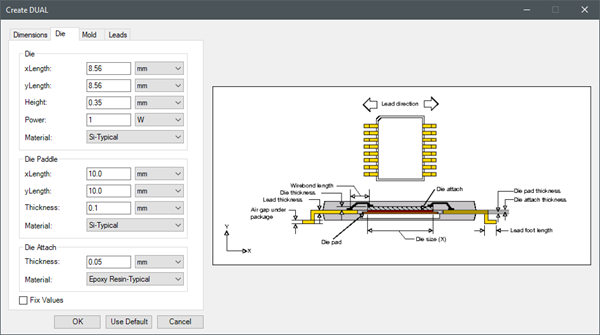
| Die | Under Die, specify the length of the die in each coordinate direction. The coordinate direction represented by Height depends on the selected Plane. Also, specify the die power and material. |
| Die Paddle | Under Die Paddle, specify the length of the die paddle in each coordinate direction. The coordinate direction represented by Thickness depends on the selected Plane. Also, specify the die paddle material. |
| Die Attach | Under Die Attach, specify the thickness of the die attach material and the material. |
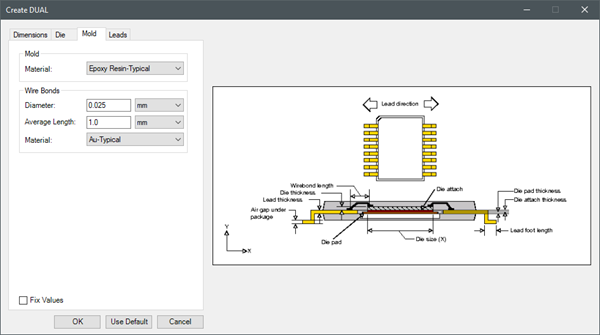
| Mold | Under Mold, select the material for the mold. |
| Wire Bonds | Under Wire Bonds, specify the diameter, average length, and material of the of the wire bonds. |
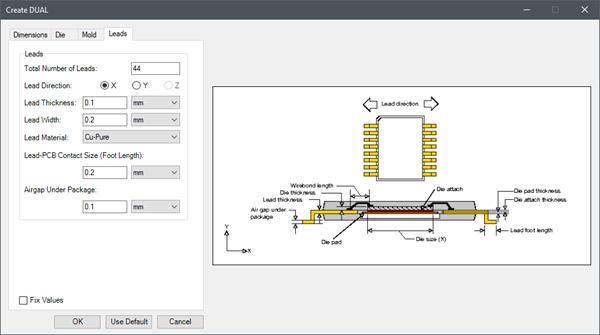
| Leads | Under Leads, specify the number of leads, the direction in which the leads will point, the lead thickness and width, material, foot length, and airgap under the package. |

Iron Python Script – DUAL.py:
The following is the toolkit's scripting information.
data = ["ng",
'length_unit:meter',
'power_unit:W',
'Plane:XY',
'xS:0.0',
'yS:0.0',
'zS:0.0',
'Length1:0.015',
'Length2:0.015',
'Package Thickness:0.0016',
'Model Type:Detailed',
'Symmetry:Full',
'Die Length1:0.00856',
'Die Length2:0.00856',
'Die Height:.00035',
'Power:1',
'Die Material:Si-Typical',
'Pad Length1:0.01',
'Pad Length2:0.01',
'Pad Thickness:0.0001',
'Pad Material:Si-Typical',
'Attach Thickness:0.00005',
'Attach Material:Epoxy Resin-Typical',
'Mold Material:Epoxy Resin-Typical',
'Wire Diameter:0.000025',
'Wire Length:0.001',
'Wire Material:Au-Typical',
'Total Number of Leads:44',
'Lead Direction:X',
'Lead Thickness:0.0001',
'Lead Width:0.0002',
'Lead Material:Cu-Pure',
'Lead-PCB Contact Size:0.0002',
'Airgap:0.0001'
]
oDesign.RunToolkit("SysLib", "Geometry/Packages/DUAL", [])
oDesign.RunToolkit("SysLib", "Geometry/Packages/DUAL", ["ng"])
oDesign.RunToolkit("SysLib", "Geometry/Packages/DUAL", data)