
Thermoelectric Cooler - Create TEC
The Create TEC toolkit enables you to create custom thermoelectric coolers (TECs) that are not included in the standard library.
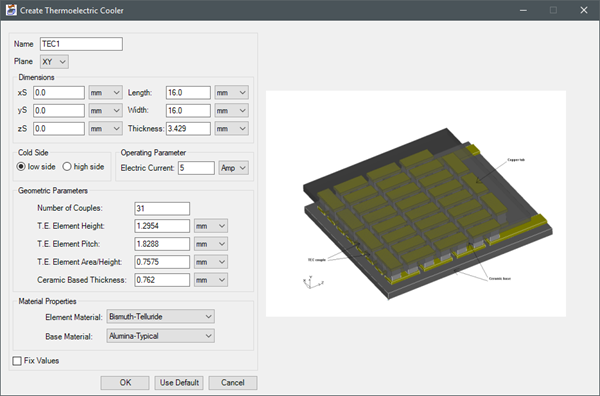
| Name | Enter a name for the TEC. |
| Plane | Specify the plane on which to place the TEC. |
| Dimensions | Specify the size of the TEC. Change the unit from the drop-down list if necessary. |
| Cold Side | Select the cold side of the TEC. |
| Operating Parameter | Specify the current that flows through the TEC. |
| Geometric Parameters | Specify the number of couples; the height, pitch, and area/height of the thermoelectric elements; and the thickness of the ceramic base. Change the unit from the drop-down list if necessary. |
| Material Properties | Specify the material for the elements and base. |
Iron Python Script – TEC.py:
The following is the toolkit's scripting information.
data = ["ng",
'length_unit:meter',
'power_unit:W',
'Plane:XY',
'compass_direction:S',
'xS:0.0',
'yS:0.0',
'zS:0.0',
'Length:0.016',
'Width:0.016',
'Thickness:0.003429',
'Cold Side:Low',
'Current:5',
'num Couples:31',
'Element Height:0.0012954',
'Element Pitch:0.0018288',
'Element Area:0.0007575',
'Ceramic Thickness:0.000762',
'Element Material:Bismuth-Telluride',
'Base Material:Alumina-Typical'
]
oDesign.RunToolkit("SysLib", "Modeling/Thermoelectric Cooler/Create_TEC", [])
oDesign.RunToolkit("SysLib", "Modeling/Thermoelectric Cooler/Create_TEC", ["ng"]
oDesign.RunToolkit("SysLib", "Modeling/Thermoelectric Cooler/Create_TEC", data)