
AEDT to Fluent
AEDT to Fluent allows you to launch Ansys Fluent to mesh and solve a design using a batch or journal file.
Note: The AEDT to Fluent toolkit is only available for the Windows version of the Electronics Desktop. Also, the following environment variables must be defined:
PRESERVE_SOLVER_INPUT = 1
PRESERVE_SOLVER_FILES = 1
PRESERVE_SOLVER_INPUT = 1
PRESERVE_SOLVER_FILES = 1
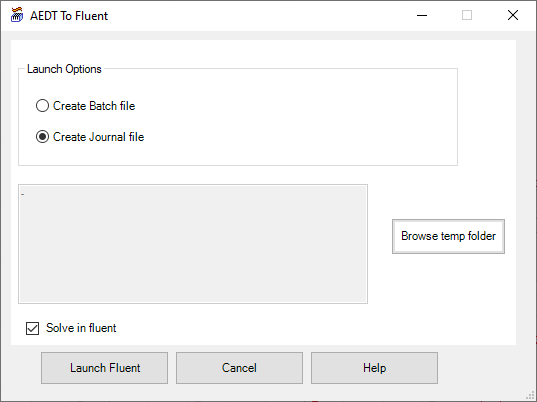
| Launch Options | |
|---|---|
| Create Batch file | Select Create Batch file to create a batch file to execute later to launch Fluent. |
| Create Journal file | Select Create Journal file to create a journal file and launch Fluent and mesh to design. Select Solve in fluent to also solve the design. |
| Browse temp folder | Click Browse temp folder to select the directory in which to create the batch or journal file. |
| Solve in fluent | If Create Journal file is selected, select Solve in fluent to also solve the design in addition to meshing. |
| Launch Fluent, Cancel, Help | Click Launch Fluent to create the batch or journal file. Click Cancel to close the toolkit without launching Fluent. Click Help to view information about the toolkit, |