Icepak Classic Fan Conversion
The table below details Icepak Classic Fan properties and their effect on Icepak native component creation in the Electronics Desktop.
| Icepak Classic Fan Properties | Electronics Desktop Native Component |
|---|---|
| Model is 2d and Shape is Circular | Fan with Model set to 2D and Shape set to Circular |
| Model is 2d and Shape is Rectangular | Fan with Model set to 2D and Shape set to Rectangular |
| Model is 3d and Shape is Circular | Fan with Model set to 3D and Shape set to Circular |
| Model is 3d and Shape is Rectangular | Fan with Model set to 3D and Shape set to Rectangular |
Fan Flow Direction
Fan flow direction is applied based on the Fan type setting (Internal, Intake, and Exhaust). The following rules are applied:
- Internal fans: flow direction is set to the direction specified in Icepak Classic.
- Intake fans
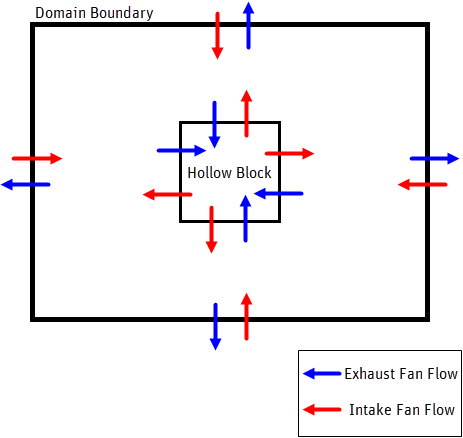
- Located on the domain boundary: flow direction is set to be normal to the domain, facing inward.
- Not located on the domain boundary: the Electronics Desktop default is set unless the fan is located on the surface of an object with Solve inside turned off. Then the direction is set to be normal to the domain, facing outward.
- Exhaust fan
- Located on the domain boundary: flow direction is set to be normal to the domain, facing outward.
- Not located on the domain boundary: the Electronics Desktop default is set unless the fan is located on the surface of an object with Solve inside turned off. Then the direction is set to be normal to the domain, facing inward.
The following image illustrates Intake and Exhaust fan flow direction on the domain boundary and on the surface of an object with Solve inside turned off.