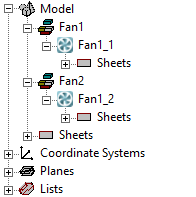
Making Component Instances Independent
When inserting an instance of a component, it is listed under the original component and assigned the same definition. To create a unique component from a component instance, use the Make Independent option in the Project Manager or History Tree.
Right-click a component in the history tree to access the History Tree Layout menu. You can organize components in the history tree by definition.
Project Manager
- In the Project Manager under 3D Components, right-click on a component instance.
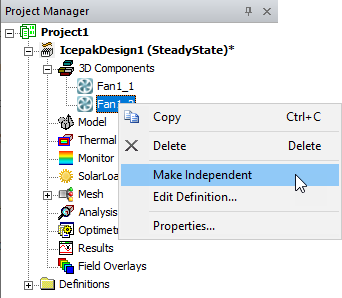
- Select Make Independent. The history tree displays the independent component.
History Tree
From the history tree, you can select multiple instances and make them independent. If you select all instances of a definition, Make Independent is unavailable.
- In the history tree, right-click on a component instance.
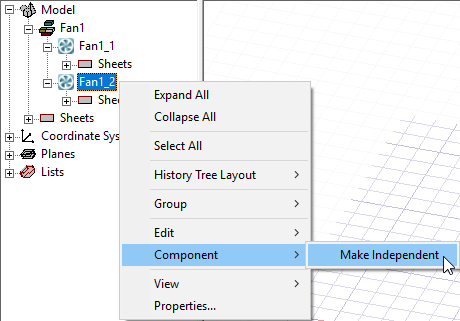
- Select Component > Make Independent.
In the history tree, the selected component appears independent of the original component and can be assigned a unique definition.