3D Components in the Project Manager Window

The Project Manager window organizes any 3D components that you add to a design under the 3D Components icon in the tree.
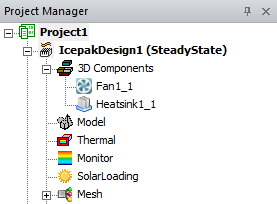
Project Manager window. Project Tree expanded showing 3D Components.

Selecting these inserted components populates the docked Properties window, which has tabs that display the instance attributes.

Related Topics:

Show, Show Only, Hide and Fit features, helpful in working with 3D components are described here:

Fit All Objects in a View Window.

Fit Selected objects in a View Window.

Showing Only Selected Objects in All or Active Views

Hiding Objects from View