
Geometry, Location, and Dimensions
Fan geometries include circular, rectangular, and 2D polygon. When creating a fan component, it is initially positioned at the center of the working coordinate system. You can change the location of the fan geometry by using the Arrange operations (such as Move) from the right-click menu in the history tree.
Simple Fans
A simple fan is a two-dimensional fan that can have circular, rectangular ,or polygonal geometry. Circular fans can include hubs. You must specify the size of the Hub Radius (inner radius), and its overall Radius (outer radius), as shown in Figure 1.
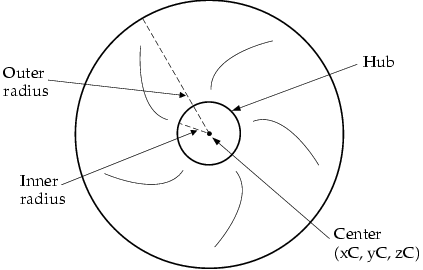
Fig. 1 Circular Fan Definition
Rectangular fans can also include a hub. To create a hub for a rectangular fan, you must specify the equivalent radius for the hub if it were to be created as a circular hub for a circular fan; that is, you specify r in Figure 2.
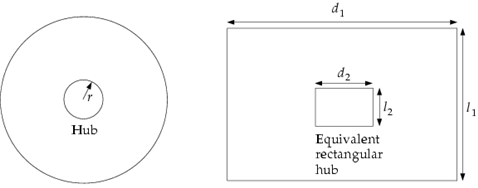
Fig. 2 Rectangular Fan Hub Definition
Icepak creates a rectangular hub with the area πr2. Icepak uses the area of the rectangular hub and the ratio of the lengths of the sides of the rectangular fan (d1 and l1 in Figure 2) to calculate the lengths of the sides of the rectangular hub (d2 and l2 in Figure 2):
|
|
|
(1) |
 and
and

If the fan is square, then d2 = l2 = x, and
|
|
|
(2) |
 that is,
