
Assigning Hollow Block Properties
A hollow block is a block with a solid material assigned and the Solve Inside option disabled. Hollow blocks represent three-dimensional regions of the model for which only side characteristics are important. Icepak does not mesh or solve for temperature or flow within regions bounded by the sides of a hollow block. Hollow-block surfaces can be specified as adiabatic (impervious to heat flow) or as possessing a fixed, uniform temperature or heat flux.
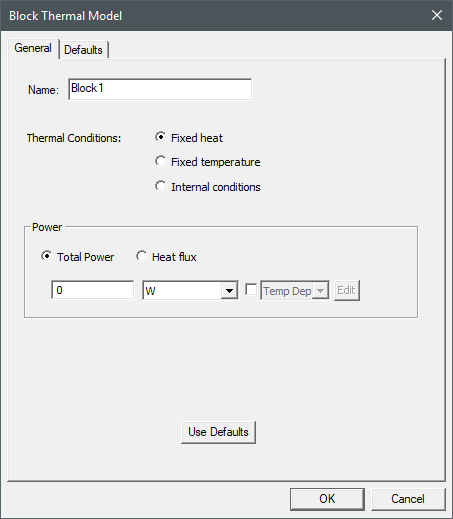
The Block Thermal Model dialog box contains the following general and thermal information for the selected boundary condition.
- If needed, you can enter a temperature dependent expression for Total Power, Heat Flux, and Heat Transfer Coefficient. See Temperature Dependent Thermal Properties for more information.
- If needed, you can define Total Power as a spatial, or volumetric, profile using an expression and a 3D dataset. See Adding 3D Datasets for more information.
| Name |
The Name of the boundary condition appears in the Project Manager window and 3D Modeler window. |
| Thermal Conditions: Fixed heat | |
| Total Power | Total Power specifies the total power dissipated by the solid block. |
| Heat flux | Heat flux specifies a constant uniform heat flux into or out of all block surfaces. |
| Thermal Conditions: Fixed temperature | |
| Fixed Temperature | Fixed Temperature specifies a constant uniform temperature for all the block surfaces. |
| Thermal Conditions: Internal conditions | |
| Internal Thermal Conditions | Internal Thermal Conditions specifies a Heat Transfer Coefficient and a reference Temperature for the internal volume of space inside the block. |
Assigning a Hollow Block and Defining Thermal Properties
To assign a hollow block boundary condition and define its properties:
- Press O to enable object-selection mode.
- Select and right-click a three-dimensional geometry component in the 3D Modeler window or the history tree.
Note:
To assign a hollow block type, ensure that the material assigned is solid and the Solve Inside option is disabled.
- From the right-click menu, select Assign Thermal>Block.
- In the Block Thermal Model dialog box, enter a Name for the block.
- Select a Thermal Conditions and enter the associated values:
- Fixed heat: Total Power or Heat flux
- Fixed temperature: Fixed Temperature
- Internal conditions: Heat Transfer Coefficient and a reference Temperature
- Click OK.
The boundary condition dialog has a Defaults tab, which contains information related to default settings for the boundary condition properties and the following buttons:
- Save Defaults saves the currently defined properties as the default for newly created boundary conditions.
- Revert to Standard Defaults sets the boundary condition properties to the saved default values.