
Project Manager Window
The Project Manager window displays the open project's structure, which is referred to as the project tree.
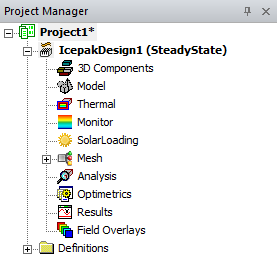
The Project Manager window displays details about all open Ansys Electronics Desktop projects. The tree display is specific to the design type. For example:
- For an Icepak design, the project includes a geometric model, its thermal boundary conditions and material assignments, monitor points, mesh regions, analysis setups, optimetrics, solution results, post-processing information, and relevant definitions. Any 3D Components appear under the 3D Components icon.
To show or hide the Project Manager window, do one of the following:
- Click View > Project Manager.
A check box appears next to this command if the Project Manager window is visible.
- Right-click in the toolbars area on the desktop, and then click Project Manager on the shortcut menu.
A check box appears next to this command if the Project Manager window is visible.