
Using the Fields Calculator
The Fields Calculator is a very powerful tool for post processing. It is available for HFSS, Maxwell, Q3D, Icepak, and Mechanical solutions. While standard post -processed results (such as S-parameters, Y or Z matrix, animated field plots, and near and far field patterns) serve most simulation requirements, the Fields Calculator enables you to perform further computations using basic field quantities. The calculator computes derived quantities from the general electric, thermal, or displacement field solution; writes field quantities to files; locates maximum and minimum field values; and performs other operations on the field solution. Using this calculator, you can perform mathematical operations on all saved field data in the modeled geometry at a single frequency. The resulting quantities can be plotted, tabulated, or exported.
The Fields Calculator includes predefined expressions appropriate for each solver and lets you create and save additional named expressions.
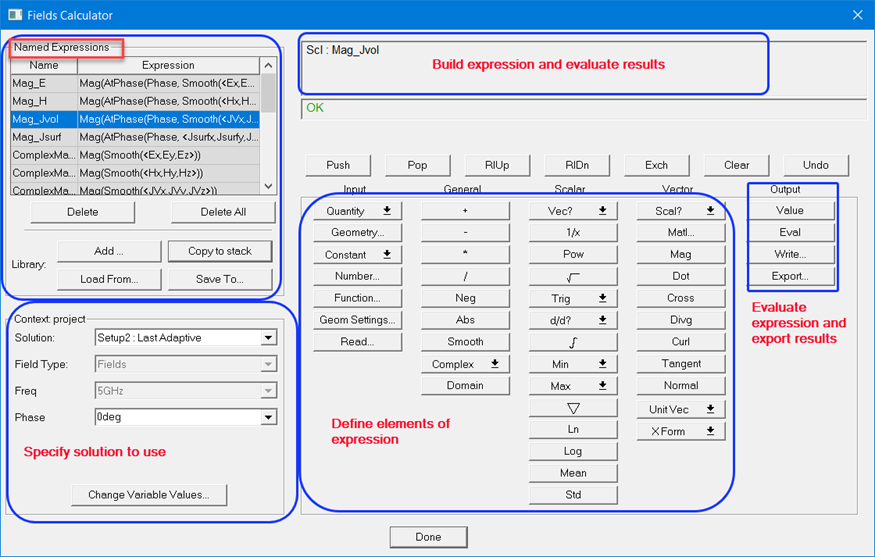
At the top-left corner of the calculator is a list of Named Expressions, which are standard or user-defined field quantities that are accessible from outside of the calculator. They can be added, copied to stack, saved to, or loaded from a library file using the buttons right beneath the list.
At the lower-left corner of the calculator is the Solution Context section, in which you can select the desired solutions, field types, frequency, and phase for the current session.
The top right of the calculator contains the Data Stack, in which calculator entries are held in stack registers. The data type in the Data Stack is denoted by its prefix abbreviation.
Immediately beneath the stack is the row of Stack Command buttons that define some basic operations for the data in the Data Stack.
The bottom half of the calculator holds the columns containing the actual calculator buttons, organized into columns, classifying them by the type of operation and the type of data upon which the operation can be performed. These columns are headed Input, General, Scalar, Vector, and Output. At the very bottom of the calculator is the button to exit, Done. The Fields Calculator interface is discussed in detail in subsequent sections.
The calculator does not perform the computations until a value is needed or is forced for a result. This makes it more efficient, saving computing resources and time; you can do all the calculations without regard to data storage of all the calculated points of the field. It is generally easier to do all the calculations first, then plot the results.
Scripting Support
All calculator operations are fully scriptable. You can save the commands used in a Fields Calculator session by first clicking the Tools > Record Script to File menu and replay the same commands by clicking the Tools > Run Script menu in a later session.

|
Click here for scripting information related to this feature. |