GetUDDInputParams

Retrieves inputs parameters for the User Defined Document. These parameters are the input’s name, description, and data type. The UDD user specifies the value of the inputs through a dialog or within the script.

UI Access

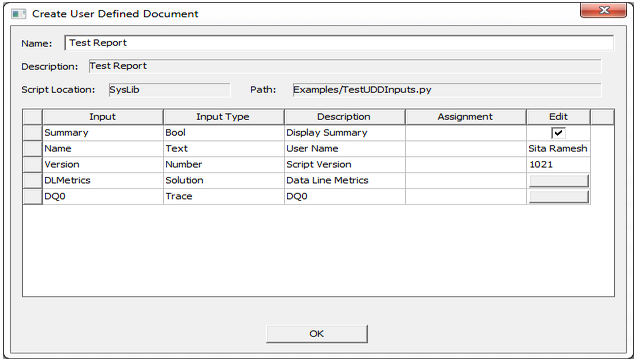
Depending on the input parameters, the following dialog may be displayed when you click HFSS 3D Layout> Results> Create Document. The name and description of the UDD are also displayed in this dialog.

Create User Defined Document dialog.

Parameters
Name Type Description
<uddInputs> List<UDDInputParams> The UDD script is expected to add one instance of UDDInputParams for each input definition that it will to display. When creating the UDD, the user will assign a matching value to each such input.
Return Value Boolean. If true, the method was successful. If false, it was not.


Python Syntax GetUDDInputParams(<probeName>)
Python Example
def GetUDDInputParams(self, uddInputs)
    # Boolean input
    param1 = UDDInputParams("Summary","Display Summary", Constants.kBoolTypeStr, True)
    uddInputs.Add(param1)
    # Text input
    param2 = UDDInputParams("Name","User Name", Constants.kTextTypeStr, "Sita Ramesh")
    uddInputs.Add(param2)
    # Number input
    param3 = UDDInputParams("Version","Script Version", Constants.kNumberTypeStr, 1021)
    uddInputs.Add(param3)
    # Solution input
    param5 = UDDInputParams("DLMetrics","Data Line Metrics",Constants.kSolutionTypeStr)
    uddInputs.Add(param4)
    # Trace input
    param5 = UDDInputParams("DQ0","DQ0",Constants.kTraceTypeStr)
    uddInputs.Add(param5)
    return True