
Creating Reports
After a solver generates a solution, you can analyze
all the results for that solution. Ansys Electronics Desktop lets you
create 2D or 3D plots. A 2D or 3D plot shows the relationship between
a design's values and the corresponding results of the analysis.
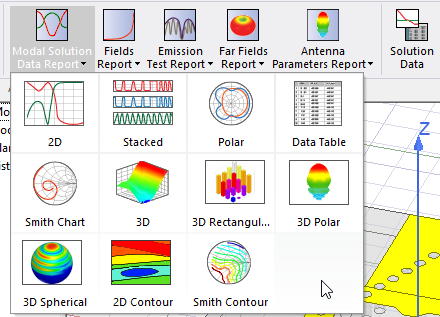
For each solution <type> , the Results menus present a list of Create <type> Report commands based on the solution data of direct interest for the design. For example, for the Eigenmode solution type, the Results menu contains templates for Eigenmode Parameters and for Fields. These appear on the menus as Create Eigenmode Parameters Report and Create Fields Report. For the Modal and Terminal Solution types, several different types appear, appropriate to each solution type. Each of these Create <type> Report menu items includes a further cascading menu that lists the Display Types available for that report. For some reports you can modify the Display Type from the Properties for that Report.
The Results tab for the Ribbon will show icons and drop-down menus for available report types for the active project.
If you have created custom report
templates (for example, including your company name or other format changes), you can
also create a report based on that template by selecting
You can also use the Report2D > Export or Report 3D >Export feature, select the Ansoft ReportData Files (.rdat) format, and Save the file, which you can later select to Create Report from File.