
Setting the Maximum Delta S Per Pass
For designs with ports or Transient Solutions for Device Characterization.
The delta S is the magnitude of the change of the S-parameters between two consecutive passes. The solver reports the worst case violation. The value you set for Maximum Delta S is a stopping criterion for the adaptive solution. If the magnitude of the change of all S-parameters are less than this value from one iteration to the next, the adaptive analysis stops. Otherwise, it continues until the requested number of passes is completed. The default value is reasonable for most cases. Setting the Maximum Delta S too small wastes computer resources and time. Setting it too large jeopardizes accuracy. Always set the Delta S with your error tolerance in mind.
Consider the worst case scenarios when setting the Maximum Delta S.
- Determine the worst case magnitude error by assuming the S-parameter magnitude is the only source of error (phase is perfectly accurate).
- Most likely the actual solution is much closer since the error will be split between the magnitude and the phase solve value.
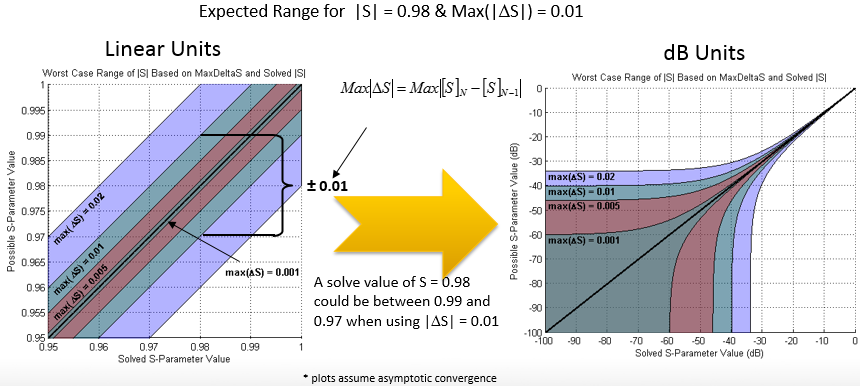
To set the maximum delta S per adaptive pass:
- Under the General tab of the Solution Setup dialog box, enter a value for Maximum Delta S.
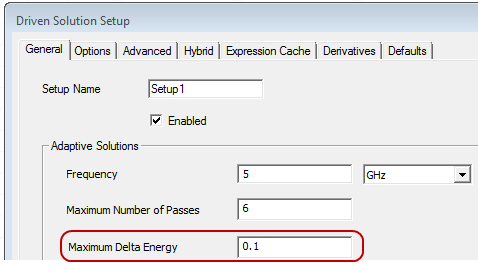
Delta S data is available only after HFSS completes two iterations of the adaptive analysis process.
Delta S is computed on the appropriate S-parameters - modal or terminal - after the S-parameters have been de-embedded and renormalized.