
Model Resolution Length
Model Resolution Length sets the threshold for the mesh maker to ignore features smaller than the default or user-specified length and captures major features in the model that are important for the simulation. Models that are imported from other sources may have extraneous details that do not contribute toward the electrical characteristics in the simulation process. If you specify an appropriate value for model resolution length, the mesh maker can selectively remove even tiny unneeded features. When you define the model resolution length for one or more objects, the mesh maker removes the triangulations for these objects.
For objects with uniform thickness or with constant cross-sections, the value specified for Model Resolution Length can be less than 40% of the thickness. The default Model Resolution Length value is 10e-4 user units. For example, if the model is drawn in mm, all gaps, stubs, holes and other features smaller than 0.0001 mm can be removed by HFSS during the creation of the mesh. It is important that you choose units and values in such a manner that all important and critical features of the model are strictly greater than 0.0001 model units.
If you modify the model resolution length operation, the initial mesh is invalidated and HFSS triggers regeneration of the initial mesh.
To set the model resolution length:
- In the Beta settings, enable HFSS FEM Mesh Assembly.
- Select a 3D object.
- In the Param Values tab of the Properties window, click HFSS Mesh Settings. The Mesh Settings window opens with Domain, Curved Surface, and Advanced tabs.
- On the Advanced tab, set the Model Resolution. This sets the optimal length of the hypotenuse for triangles in a mesh.
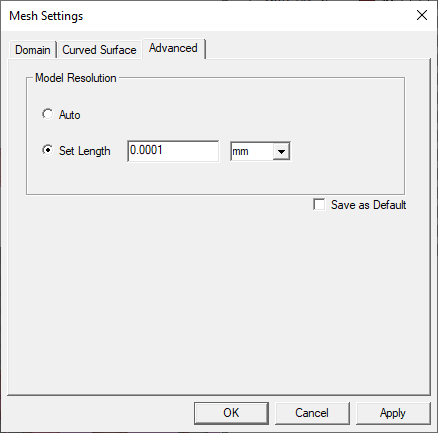
- Click Auto to allow the mesher to determine the optimal length.
- For a precise length, click Set Length and enter a physical distance with units.
- To save this setting as a default for future models, click Save as Default.
- Click Apply.
- Click OK.