
Defining a Curved Surface Mesh Operation
A
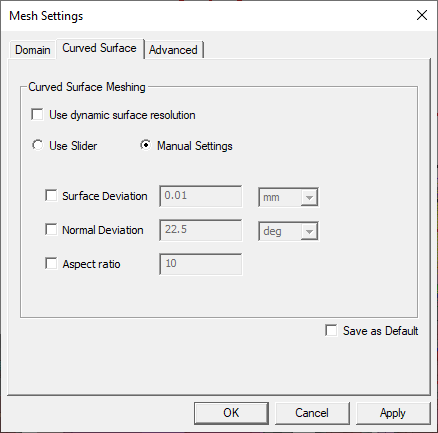
Normal Deviation Angle
By default, Normal Deviation
is 22.5 degrees in HFSS. When specifying
The following illustrations show a model that has two
cylindrical objects.
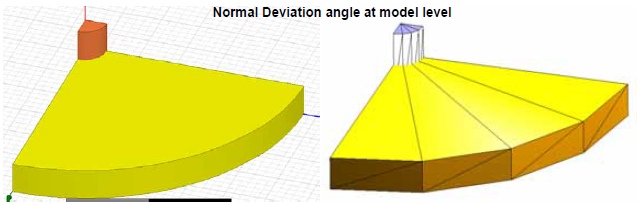
In
HFSS
Maximum Surface Deviation Length
An appropriate value of Surface
Deviation supplements the Normal
Deviation setting. When you set Surface
Deviation in addition to the Normal
Deviation setting, it can further improve the geometry representation.
By specifying Surface Deviation you
can control the difference between the faceted face and the real curved
face. Surface Deviation is defined
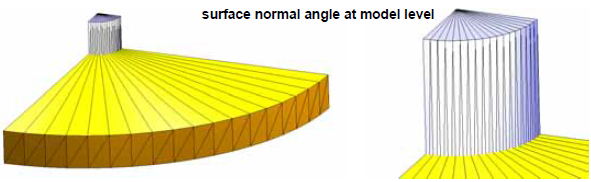
in user unit. Consider the same model with two cylindrical objects. In
this mode, if you specify 30 degrees as the Normal
Deviation, there are 3 segments on both cylindrical surfaces
as expected.
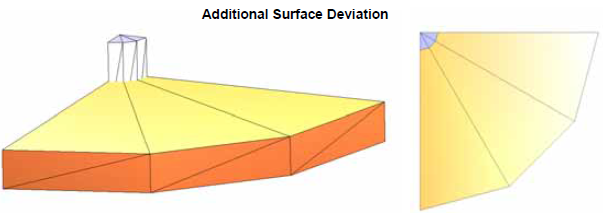
Since
the radius of the large cylindrical surface is 6mm, set 0.06mm as the
Surface Deviation in the
To summarize, the Surface Normal Angle of 30 degrees provides one facetation of the geometry, and the Surface Deviation of 0.06 mm controls the difference from the real curvatures. Since the small faceted cylindrical surface already has the difference smaller than 0.06 mm, the surface is maintained as is. However, since the large cylindrical surface has a gap greater than 0.06mm, the facetation is made finer to adhere to the specified length.
As a rule of thumb, large surface normal angle can control the small curved objects while small Surface Deviation can control the large curved objects in the model-level mesh operation. Surface Normal Angle is effective for skewed curved surfaces.
Aspect Ratio
Aspect Ratio is the ratio of the longest length of an element to its shortest length. Aspect ratio controls the faceting triangle ratio. It is needed only when you want a highly uniform mesh on the curved surfaces or when the curved object is either thin or has a narrow gap. By default, Classic mesher uses 20.0 as the Aspect Ratio whereas TAU mesher uses 8.0 as the Aspect Ratio.
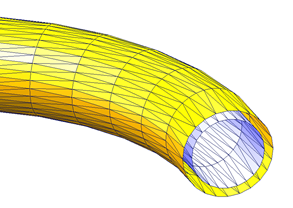
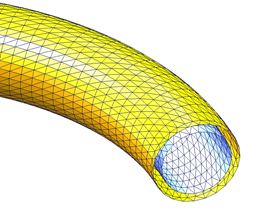
When there is a narrow gap between two curved surfaces, a small value of aspect ratio ensures the gap to be uniform. The figures below illustrate a geometric model with the aspect ratio of 20 and 2. Smaller aspect ratio ensures better representation of the curvature for skewed curved surfaces, especially in thin curved layers.
Use caution when assigning a small aspect ratio, since it will produce a dense mesh at many other curved surfaces which may not require the denseness.