
Unit Interval and Amplitude Values for Circuit Bathtub Curves
You can specify values for the Unit Interval or Amplitude while plotting bathtub curves for a QuickEye or VerifEye analysis. The controls allow you to choose between two check boxes for Use mid-point or Use value. The menu allows selection of Amplitude or UI.

- When the Use value group box is checked, the edit window is enabled, allowing you to enter an Amplitude or UI value at which to see the bathtub curve. Electronics Desktop interpolates the data to plot a bathtub curve at that Amplitude or UI.
- The Use midpoint check box can also be enabled. Select Amplitude or UI on the menu.
- By default, the Use midpoint box is checked, and the midpoint of Amplitude is used as the default sweep value for the plot.
- Bathtub noise floor range is e-16 to ~ e-21.
- Default data length is set at 218 or around 2.5x10⁵.
- BitPattern is PBRS and "random bit pattern generation".
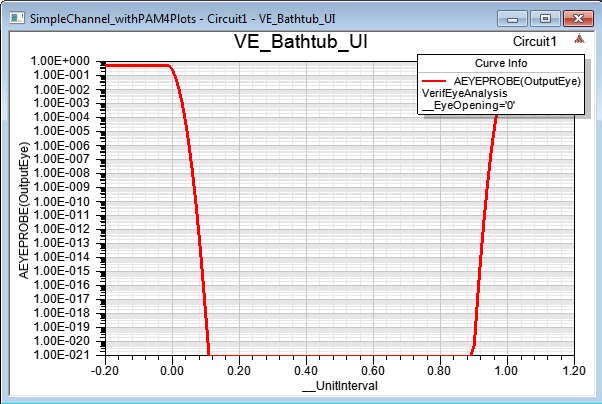
The following shows a VerifEye plot with the default settings and NRZ transmission (X-axis is the UI):
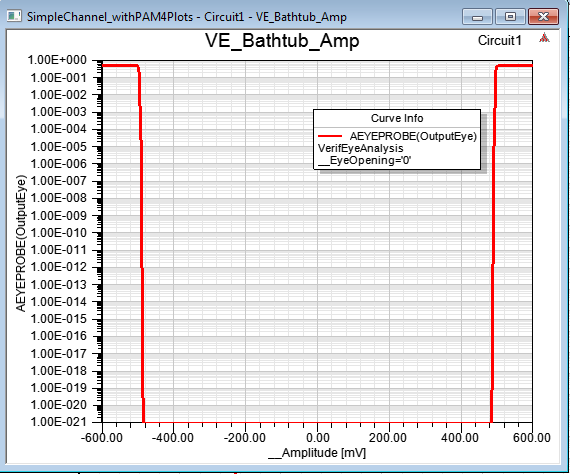
Following is a VerifEye plot centered on the UI with NRZ (X-axis is the Amplitude):
Following is a VerifEye PAM-4 plot centered on the Amplitude (X-axis is the UI):

- The PAM-4 eye has three levels. The Symbol error rates for each of the three sub-eyes is shown in a different trace.
Following is a VerifEye PAM-4 plot centered on the UI (X-axis is the Amplitude):
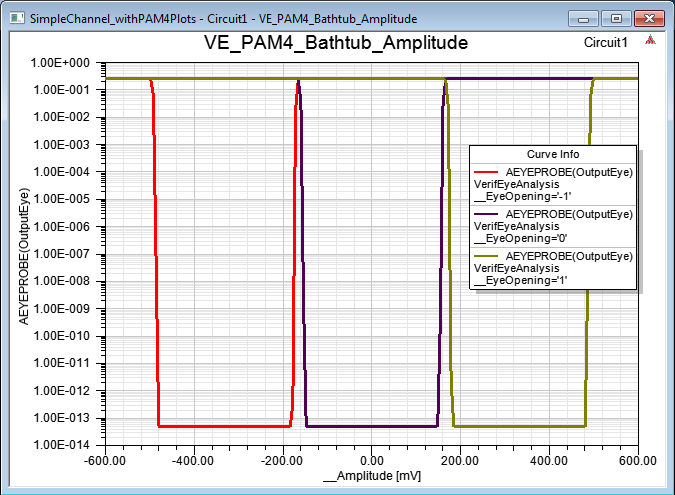
The above shows the symbol error rates for each of the three are depicted as three separate traces at different voltage levels.