
Modifying Circuit Eye Diagram Reports
Double-click the Report to open a Property window with several tabs.
- Click the General tab to set the background color, plot area, and other general parameters.
- Click the Mask tab to enable and define a mask or keep-out region that is overlaid on the eye diagram. Click Show Mask to enable the edit fields. You can specify the fill color, boundary color, and transparency.
Click Edit on the Mask tab to open the Edit Eye Mask window:
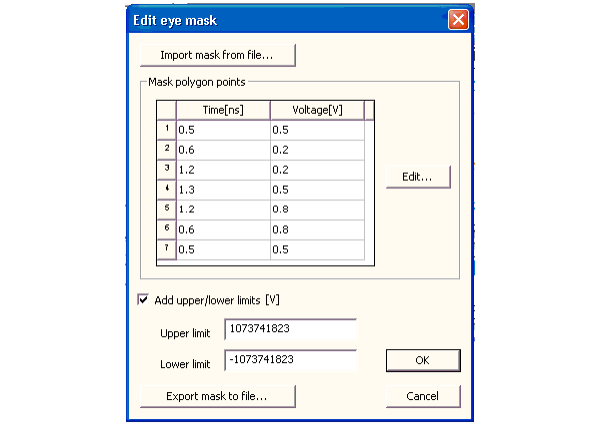
Use the window to specify edit points that define the mask polygon and upper and lower limits as applicable. If appropriate, save the mask setting to a file.
Click OK to open the mask on the eye diagram.
- Here is how the mask appears on the graph:
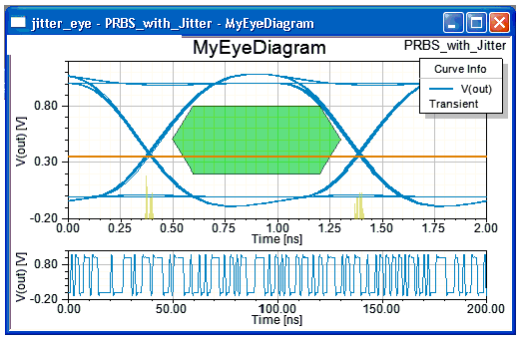
- Click the Histogram tab to control
the display of a histogram that counts the number of crossings of a
specified Y-value. In the illustration above, the histogram is in yellow
and the Y-value is the orange line. Here is the Properties page showing
the histogram setup fields:

Adding Trace Data to the Eye Diagram Report
Right-click the Report and select Trace Characteristics > Add to open the Trace Characteristics window. Select a Category of data, then select a Function within that category. Click Add. The value of the trace characteristic is added to the report display.
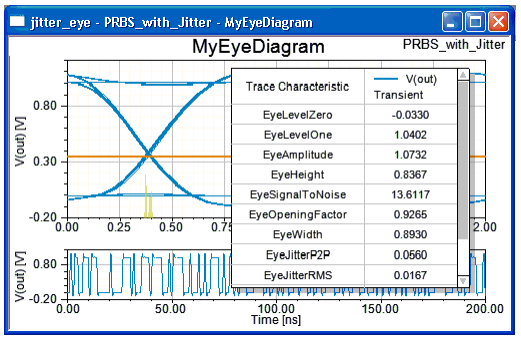
Right-click the Report and select Trace Characteristics > AddAll Eye Measurements on the menu to open the trace measurements in tabular format. Here is the result:
Eye Diagram References
A tutorial on interpreting eye diagrams may be found at:
http://www.complextoreal.com/chapters/eye.pdf
Other references on eye diagrams may be found at:
http://www.scientificarts.com/logo/logos.html
http://www.findarticles.com/p/articles/mi_m0HPJ/is_n4_v45/ai_16226058