Open topic with navigation
HFSS Dynamic Link
Outputs in Circuit Reports
- Select Reports>Create Link Output
Report, then select a display type, such as Rectangular Plot, to open the Create Report window.
- For Solution, select the Circuit
solution. Select the Solution Domain.
- The Component field lists the available
HFSS dynamic link objects.
- The Source trace field lists the
traces selected to be exposed by HFSS.
- From the Trace tab, select the HFSS
sweep that is to be the primary sweep.
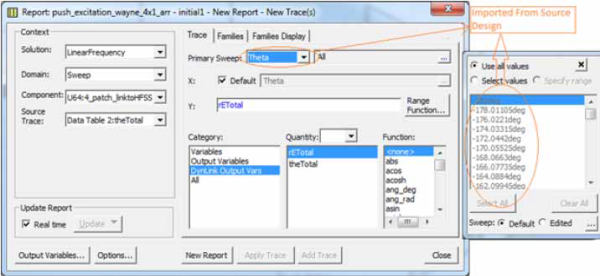
- The Category is selected as DynLink Output
Var.
- The Quantities field lists the
X, Y, or Z expression with its quantity and output variables. (1D trace:
X expression; 2D trace: Y expression; 3D trace: Z expression.)
- From the Families tab, there are
a list of Circuit solution variables with HFSS variable mappings,
and unmapped HFSS solution intrinsic variables.
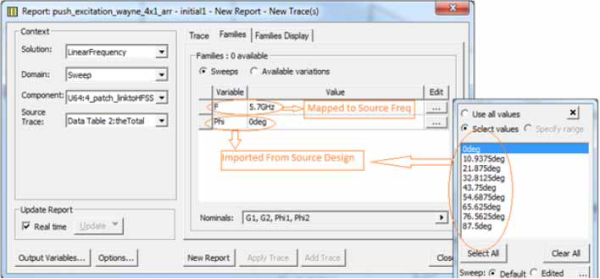
- The Circuit F intrinsic variable is automatically
mapped to the HFSS Freq variable. Unmapped HFSS intrinsic variables
values is imported on the HFSS solution. Unmapped Circuit variables
get values on the Circuit solution only.
Ansys Electromagnetics Suite 2024 R2 - © ANSYS, Inc. All rights reserved. - Contains proprietary and confidential information of ANSYS, Inc. and its subsidiaries and affiliates.
