
Electronics Desktop lets users create encrypted password-protected files (typically in SPICE format) that may be added to other designs via .lib, .va, or .inc statements. Access the encryption tools through the Tools > Password Manager window.
Password Assignment Types
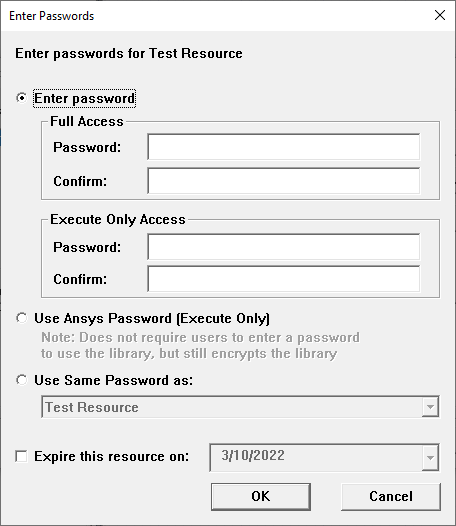
From the Enter Passwords window, accessible on the Password Manager > New... option, an encrypted file may be assigned a choice of password types:
-
Enter password: User-defined passwords for an encrypted library file. Entering and confirming Full Access passwords grants users simulation, read, and edit permissions, while Execute Only Access permits users to add components and simulate a design, but they cannot read or edit the contents.
-
Use Ansys Password (Execute Only): A generic, hard-coded execute-only password shared across all Ansys products. Any Ansys product may read an applicable file encrypted in any other Ansys tool using the Ansys Password, making it the easiest way to share encrypted library files among Ansys applications if the files are not expected to be viewed or editable.
-
Use Same Password as: Choose an existing resource on the drop-down menu to use the same password settings and synchronize passwords across multiple library files.
- Passwords are not saved between sessions and must be re-entered each time Electronics Desktop is started. Passwords are available after one project is closed and another is opened, if the application is not restarted.
- Electronics Desktop and Nexxim use the Advanced Encryption Standard (AES) to encrypt libraries and models. Electronics Desktop and Nexxim use a 128 bit block cipher with a 256 bit key.
- You can encrypt selected parts of a file
by enclosing them within a protected “block”. You
can set up multiple .protect/.unprotect blocks in the same file, but
you cannot nest them.
e.g.,.protect
This block is encrypted.
.unprotect