
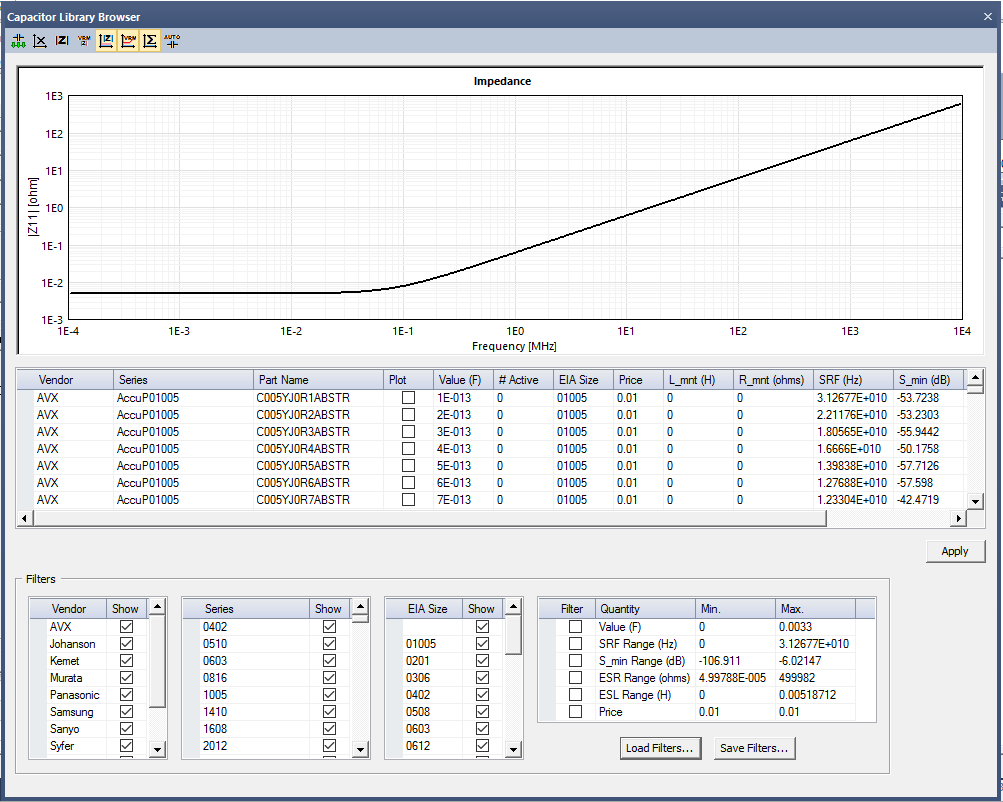
SIwave allows you to define VRM parameters and impedance requirements, then automatically select capacitors that meet those requirements. Also plot the impedance of various vendor or imported capacitor components versus frequency.
To view the Capacitor/Inductor Library:
- Select a capacitor in the Components window, click Model Info for the capacitor in the Properties window, then in the Component Model window that appears, click the Library Browser to open the Capacitor/Inductor Library Browser window.
You can sort the values in each column by clicking the column title.
- To automatically select the capacitors
that match the defined impedance profile, click the
 icon.
icon.
- To manually select the capacitors, click the Plot check box. To plot all the capacitors, click the Plot column title.
- Specify filters for the options that you want to show. You can save these options to a .cff (capacitor filter criteria) file. Also load an existing filter.
- To update the value for multiple capacitors, make a selection on the value drop-down menu. Then enter a value for all the selected capacitors in the field, then click Update.
- To import a capacitor model from a Touchstone
file: click the
 icon to open the Import S-parameter Component window. Specify the
component details, and click OK.
icon to open the Import S-parameter Component window. Specify the
component details, and click OK.
- To remove all capacitor impedance curves
that have been selected, click the
 icon.
icon.
- To define the impedance requirements,
click the
 icon to open the Define Impedance Mask window. You can create and
save the existing profile, or load a saved profile.
icon to open the Define Impedance Mask window. You can create and
save the existing profile, or load a saved profile.
- To define VRM parameters, click the
 icon to open the Define VRM Parameters window. Specify the ESL and ESR parameters,
along with the plot color, and click OK.
icon to open the Define VRM Parameters window. Specify the ESL and ESR parameters,
along with the plot color, and click OK.
- To change the display options, click
the corresponding
 icons
to display impedance mask, VRM output impedance curve, or aggregate
output impedance curve.
icons
to display impedance mask, VRM output impedance curve, or aggregate
output impedance curve.
- To update the value for multiple capacitors, make a selection on the value drop-down menu. Then enter a value for all the selected capacitors in the field, then click Update.