
Nexxim supports the import of W-element models via an import wizard.
To open the wizard:
- View the Component Libraries. Open the Symbols area. Click Import Models.
- From the area, select the W-ELT icon to open the W element import window.
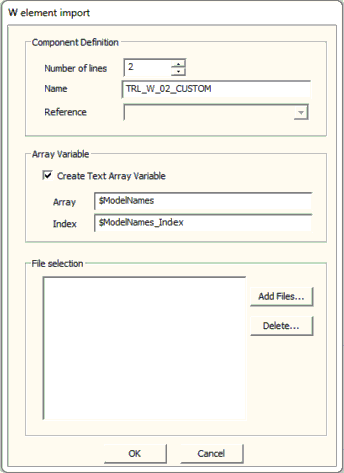
3. Enter the Number of lines for the W-element.
4. Click Add Files to browse to a directory containing the data files for the W-element.
You can select multiple files. If Create Text Array Variable is checked, Electronics Desktop creates a text array index to store the multiple files. The model is then created as a parametric model.
5. Click OK. An instance of the W-element is attached to the cursor, so drag it into the schematic to place the W-element. When instances of the component are placed, right-click and select Finish or press Esc on the keyboard to stop placing instances.
If the model was created as a parametric model, simulation setups can sweep the entries in the text array index ($ModelNames_Index in the example).