
Input: Amount to size (can be positive or negative)
One DV layer (containing polygons)
Angle of truncation (optional)
Output: DV layer (containing polygons)
Description: Creates and returns a DV layer that contains geometry generated by performing an over-size or under-size operation on the specified layer. The size amount may be given with or without units. If no units are specified the current default length units are used.
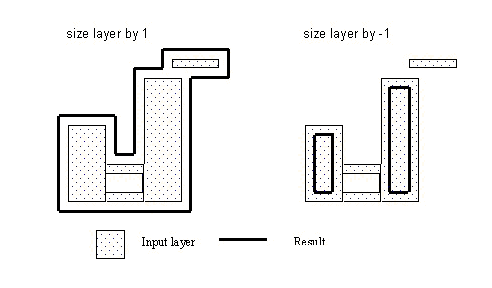
- A size operation consists of changing the absolute dimensions of shapes without altering their dimensions relative to each other. This is not a scaling operation.
- The shape of an object may change. Polygons changed by Sizing may change their original shape when there are shape features that are less than or equal to twice the size value. Holes and notches disappear in a positive grow, and narrow sections disappear in a negative grow
- Objects that grow into one another are merged
together. An object may become multiple objects if a negative grow removes
a part of the original object that connected other portions.
- The truncation angle is specified in degrees with a number >= 0 and <= 90. If an angle is not given, 90 degrees is used as the default.
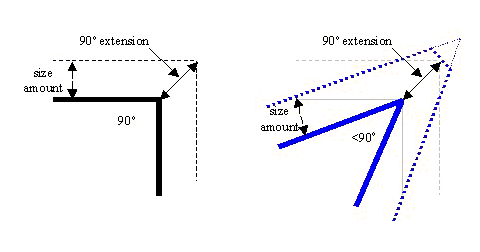
- The expansion of acute angles is truncated to
avoid an out of proportion extension (a “spike”) of an acute corner.
Any angle smaller than the angle of truncation are truncated. The
default angle of truncation is 90 degrees. Any angle less than 90 is
truncated to the maximum extension of the shape at a 90 degree corner.
This extension shown by the solid black arrow in the following diagrams.
The length of the extension is the square root of 2 times the size amount.
This 90 degree angle-of-truncation matches both Diva® verification and
the corner bend style in layout. For more information on Diva verification,
see http://www.cadence.com/products/dfm/diva/index.aspx.
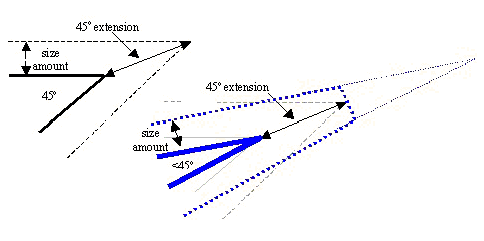
- A different angle may be specified. To match
the Calibre default, use 45 degrees. The length of a 45 extension is
the size amount times 1/cos 67.5.
Rule Set Examples (JScript):
var layer1 = DVChecker.ImportLayer("trace");
var sizedLayer = DVChecker.Sizing(2, layer1, 45);
var sizedLayer2 = DVChecker.Sizing(“5mm”, layer1);
var shrinkAmt = -5;
var sizedLayer3 = DVChecker.Sizing(shrinkAmt, layer1);