
Component External Power This property is available only with a single component import that references a Package Model. When Component External Power is On (checked), Nexxim expects power to be supplied via the terminal pins on the component schematic symbol, and the power property is ignored for the individual pins. Nexxim connects power buses as described in the component [Pin Mapping] entry.
If you subsequently deactivate (uncheck) Component External Power, the power to each pin must be specified with its power property (on the Pin Info window), and any POWER or GND pins that are imported become No-Connects.
If you subsequently deactivate (uncheck) Component External Power, the power to each pin must be specified with its power property (on the Pin Info window), and any POWER or GND pins that are imported become No-Connects..
Power Connections for power nodes, internal or external. This parameter is enabled when a single component with a package model has the Component External Power deactivated, and for all imported single pins and buffer models.
When the power property is set to external, the Pin Properties show the power pins:
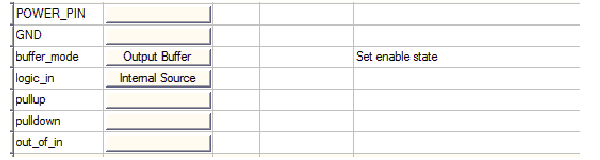
Click the power, ground, pull-up, and pulldown Value field buttons to open the window, then select on the available nets.
Use page ports to name the outputs of sources in the circuit as nets.
For more information, see Power Nodes in the IBIS File Import Technical Notes