
From the Simulation tab, choose the simulation options of the N-Port.
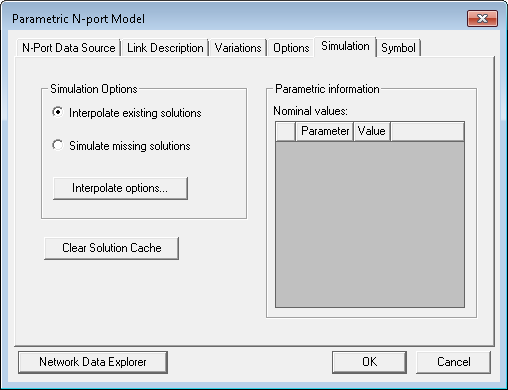
- Interpolate existing solutions interpolates existing solution data. When Interpolate existing solutions is not selected, the solver simulates or calculates any solution data that is needed.
- Simulate missing solutions asks HFSS or Q3D to simulate, if the solution is not available.
- Clear Solution Cache when clicked clears the solution cache memory.
- Show available variations queries HFSS and reports what parameter values have been simulated in HFSS. This information may help you to decide whether to solve additional variations in HFSS or to use interpolation when doing co-simulation with the Circuit solver and HFSS. Though the HFSS project may possess several variables, it may have run simulations only for certain values of those variables. (Each set of variable values defines a variation.)
- Click Interpolation options to open the
following window:
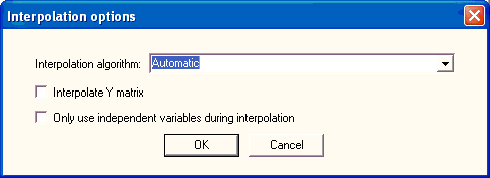
- Click the down arrow in the Interpolation algorithm field to select an interpolation algorithm option:
Automatic – Linear interpolation is used if a full grid of solutions is present; otherwise, Inverse Least Squares with Shadowing and Hyperplanes is used.
Linear – When a full grid of solutions is available, the cube of solutions which surrounds the solution to be interpolated is located. The corners of this cube are linearly averaged to determine the interpolated solution. If a full grid is not available, an error is reported and the interpolation fails.
Inverse Least Squares with Shadowing and Hyperplanes – Least squares interpolation with shadowing and hyperplanes.
Inverse Least Squares with Shadowing, no Hyperplanes – Least squares interpolation with shadowing, but no hyperplanes.
- Interpolate Y matrix uses the Y matrix as the basis for interpolation. When Interpolate Y matrix is not selected, the S matrix is used as the basis. Interpolate Y matrix is selected by default. Circuit particulars determine which basis (S or Y) yields better results, and it is not possible to decide beforehand which one works best.
- Only use independent variables during interpolation suppresses the calculation of dependent variable values during interpolation.
After choosing interpolation settings, click OK to close the Interpolation options window. When the N-port Simulation options have been entered, click OK or select another tab.
The main difference between Linear interpolation and Inverse Least Squares with Shadowing (ILSS) is as follows:
- Linear works only with a full grid of solutions — ILSS works with arbitrary data.
- Linear considers only nearest data — ILSS considers data that could possibly be distant, although shadowing mitigates this effect.
- Linear is not first-order continuous — ILSS is first-order continuous.