Options for Broadband Fast Sweeps
The Broadband Fast Sweep uses the same lumped port model as the Enhanced low frequency accuracy option available in the HFSS Setup window to all frequency sweeps. This is the case whether the Enhanced low frequency accuracy check box is checked or otherwise.
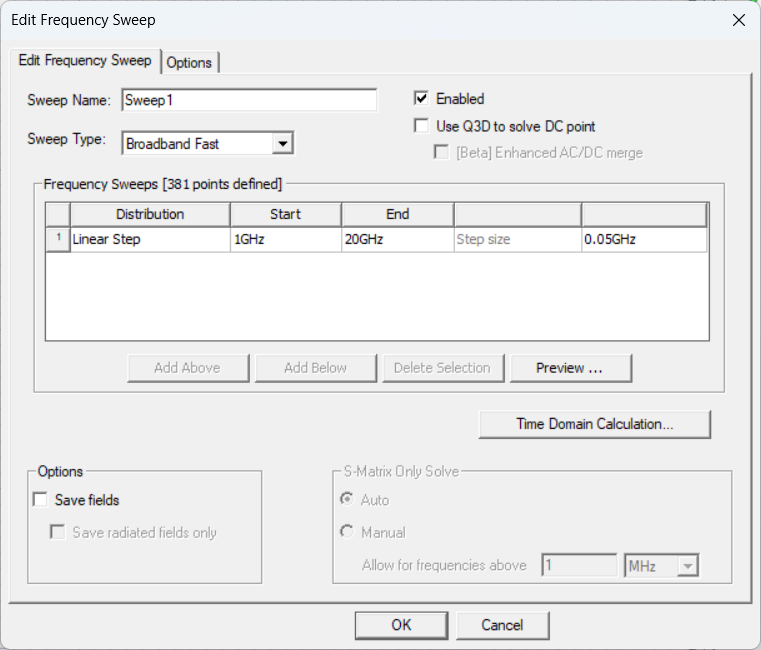
The Edit Frequency Sweep window for broadband fast sweeps includes the following options:
Edit Frequency Sweep Tab
- Sweep Name: enter a name for the sweep in the field.
- Enabled check box: active or deactivate the sweep.
- Frequency Sweeps area .
- Use Q3D to solve DC Point check box: choose whether to use Q3D to solve DC point.
Use Q3D to solve DC point provides network data only and cannot be used for fields overlays.
- Options area: choose whether to check the Save Fields box and/or the Save radiated fields only (default is unchecked). If the Save Fields box is checked, HFSS 3D Layout solves the Broadband Fast Sweep, computes the fields at each frequency in the sweep, then saves them. This has two effects: the simulation takes longer, but post-processing is much faster. Since these options are exercised at solve time, they do not apply to existing solutions. Enabling this option for a previously solved sweep and re-solving will access the previously solved data and generate the requested fields. If there are more than one hundred frequencies, checking the Save Fields box generates a warning that disk space use may be excessive.
Selecting Save Fields enables the check box for Save radiated fields only.
Options Tab
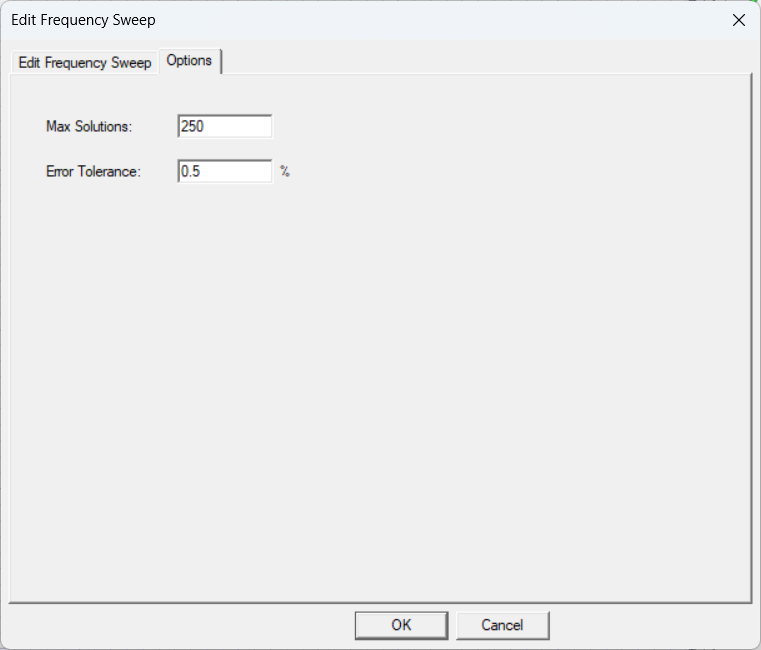
From the Options tab, do the following:
Max Solutions: enter the maximum number of solutions that can be solved for the frequency range (default is 250). The value must be greater than 3.
Error Tolerance: set the maximum relative difference allowed between two successive points (default is 0.5). The default set the error tolerance percentage.