
Input: Two DV layers (containing polygons)
Output: DV layer (containing polygons)
Description: Creates and returns a DV layer that contains geometry generated on the first layer geometry areas that are not common to the second layer geometry. This is not a symmetric operation. The order of the input layers does change the results.
- Not(A, B): Area covered by geometry on
layer A that is not also covered by geometry on layer B.
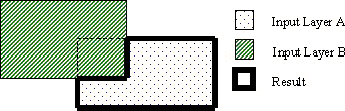
- Not(B, A): Area covered by geometry on
layer B that is not also covered by geometry on layer A.
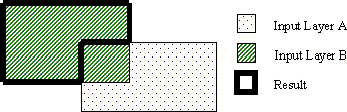
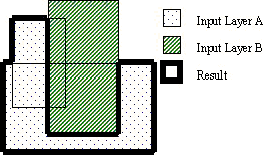
- Geometry on input layers that are imported is
merged prior to performing the Not operation. From the following
example the two rectangles on layer A are merged into one polygon before
doing the Not(A, B) operation. The result of the Not is one polygon.
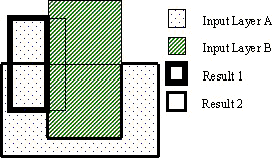
- If the input layers are not imported (they are
created within DV), the geometry is used “as is”. From the following example
the two rectangles on layer A are not merged before doing the Not(A,
B) operation. The results of the Not are a rectangle and a polygon
that overlap.
Rule Set Example (JScript):
var layer1 = DVChecker.ImportLayer("trace");
var layer2 = DVChecker.ImportLayer("ground");
var notLayer = DVChecker.Not(layer1, layer2);