
The Noise Data tab can be used to enter solution data manually or used to view solution data from an imported file.
- To view the contents of an imported solution, double-click the solution in the Project Tree and select the Noise Data tab on the N-port data window.
- To manually enter solution data for post-processing,
select Enter data in spreadsheeton the N-Port Data
tab, then select the Noise Data tab on the N-port data window.
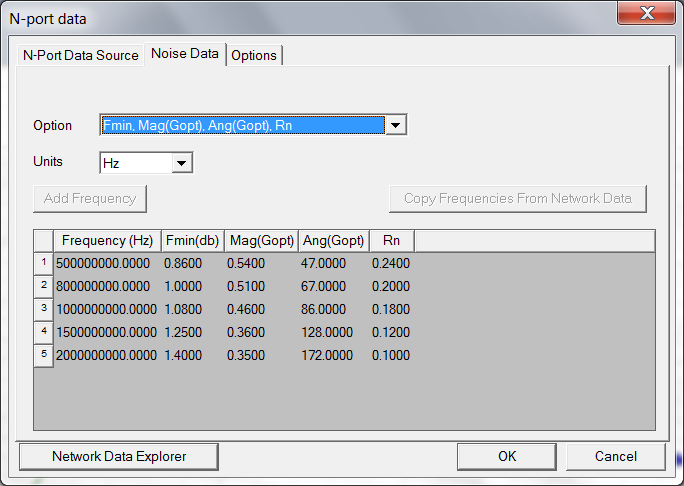
The following controls are available:
Domain – Sets the Frequency or Time domain.
Format – Sets the Format to one of the following: Magnitude/Phase, Real/Imaginary, or dB Phase.
Units – From the Frequency domain, sets the units of frequency: Hz, KHz, MHz, GHz, THz, or rps.From the Time domain, selects the units of time: fs, ps, ns, us, ms, or s.
S Matrix – Identifies the data as S-parameter values.
Y Matrix – Identifies the data as Y-parameter values.
Z Matrix – Identifies the data as Z-parameter values.
Gamma – Identifies the data as Gamma values.
Z0 – Identifies the data as Z0 values.
Ports – Sets the number of signal ports.
Phase Rotation — Click to set the Phase Rotation of the N-Port Noise Data source.
When the Noise Data options have been entered, click OK or select another tab.
- The Electronics Desktop Planar EM tool can interpret only frequency-domain data.
- If the solution data file contains complex propagation constants or characteristic impedance values, select Gamma or Zo to view the data — but to run a simulation in Electronics Desktop, the information is not required.