
State Space N-Port Data Options Tab
The Options tab is used to select the behavior of the selected NPort.
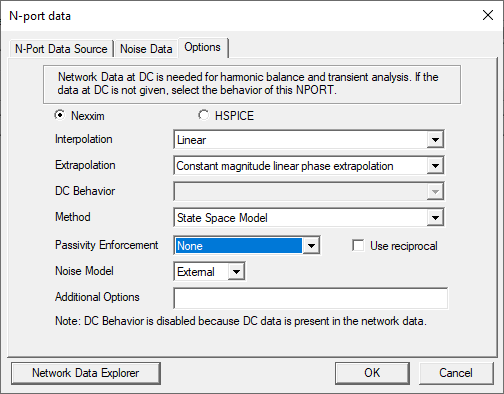
The following controls are available:
- Nexxim/HSPICE — Sets the NPort type. The selections for Interpolation, Extrapolation, DC Behavior, Method, and Passivity Enforcement depend on the NPort type selected.
- Interpolation — Specifies the interpolation method for data points in the frequency range of the Touchstone data.
- Extrapolation – Specifies the extrapolation method for data points outside the frequency range of the Touchstone data.
- DC Behavior — Specifies behavior of the N-Port at DC (zero frequency).
- Method – Specifies the method used to convert frequency domain data to the time domain. Choice of methods is available only for Nexxim Nports.
- Passivity Enforcement — Performs a passivity
check on the S-parameter data and attempts to correct non-passive data.
The options are None, IFPV, IFPVLF, Convex Optimization, and Passivity by Perturbation.
Passive devices may dissipate or temporarily store energy, but never generate energy. Use the drop-down menu to select the method for enforcing passivity. Passivity enforcement is available only for Nexxim NPorts. See Passivity Checking and Enforcement. For details on passivity checking and enforcement, see S-Parameter Technical Notes.
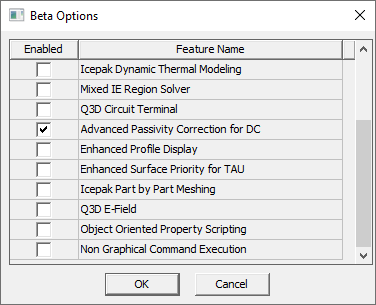
When applying IFPVLF, the passive DC fit to Scattering Parameter Data (S-data) can deteriorate to the point the inaccuracies of the (passive) fit to the corresponding Impedance Data (Z-data) at zero frequency (DC) and low-frequency may cause inaccurate time-domain steady state simulations. If preserving an accurate passive DC fit to S-data is important, like it is in power electronics applications, e.g., with DC-DC converters and power supply Voltage Regulator Module (VRM)), then click the Advanced Passivity Correction for DC beta option to enhance the passive DC fit to S-data using IFPVLF. The Advanced Passivity Correction for DC is located in the Beta Options in the Global Options.
- Use reciprocal – Computes the inverse, or reciprocal, at each frequency so the N-port can be used for de-embedding. See Deembedding S-Matrices.
- Noise Model – Specifies noise model for
DC and frequency-domain analyses:
- None – No noise analysis
- Internal – Use internal noise model
- External – Use noise data from Touchstone file if present, else use internal noise model
- Additional Options — Allows you to add model-level options for Nexxim or HSPICE.
When the N-port Options have been entered, click OK or select another tab.
- Network Data Explorer – Allows you to view solution data by opening the Network Data Explorer.
When the N-port Options have been entered, click OK or select another tab.