
Array data in tabular format can be imported from a file using the Array Import wizard. From the Tools menu, select Import Array from Table to open an explorer window. Then choose .csv file to import data from.
The tabular array .csv file should contain the following formatting:

- First row consisting of list of Array Index Variable names separated by tabs or commas
- Remaining rows consisting of a list of string values separated by tabs or commas
- Double quotation marks (“ “) for string values are optional
After you select a .csv file to open.
- If no existing array variables are present in the design, the Import Array From Table: New Variables window opens.
- If one or more existing array variables are present in the design, the Import Array From Table: Existing Variables window opens.
Each window is shown in the following diagram.
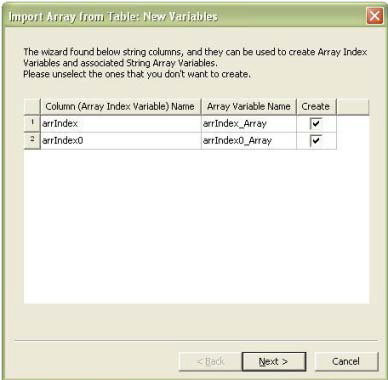
The following controls are available:
- Column (Array Index Variable) Name cannot be modified and is used to create the array index variable.
- The associated Array Variable Name has the default name “<ColumnName>_Array". You can modify the Array Variable Name, but variable uniqueness and validity is checked upon closing the wizard.
- Click the Create check box to specify that the array index variable should be created.
- Click the control buttons at bottom to go Back to the previous wizard window, proceed to the Next wizard window, or click Cancel to close the window without making changes.
If one or more existing array variables are present in
the design, clicking Next in wizard window opens the Import Array From Table: Existing Variables window.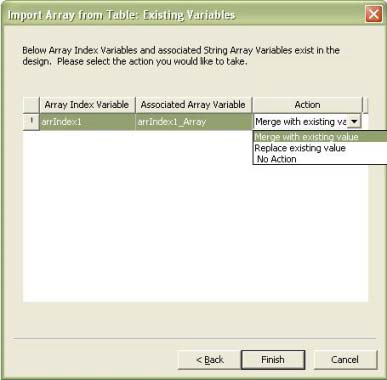
The following controls are available:
- Array Index Variable name can not be modified.
- Associated Array Variable can be modified, but variable uniqueness and validity is checked upon closing the wizard.
- The following choices appear in the Action drop-down menu:
— Merge with existing value
— Replace existing value
— No Action
If you select Replace existing value, you are then prompted for verification.
- If you import a file to a design where a string column already exists as an ArrayIndexVariable, the value of the variable is checked when imported. If the existing array value is a superset of new array values, the array variable are appear in the ExistingVariables window.
Also use the same .csv tabular array file to setup a parametric analysis. See Optimetrics.
When the parametric analysis is set up, the ArrayIndexVariable is searched and its index is used to create the table. Whether the ArrayIndexVariable refers to a double array or a string array, you must use the array element on the imported file — rather than the index value itself — to set up the Parametric from File analysis.