
You can “expand” objects in Layout using the Draw > Expand command. Click Draw > Expand to open the Expand Polygon window.
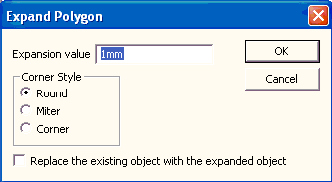
- Expansion value can be positive or negative (e.g., “2mm”, “-2mm”). The object is expanded or shrunk by the distance specified.
- The Corner Style (where expanded sides meet) can be specified as Round, Miter, or Corner. When Corner is chosen, if the corner extension results in a projection greater than 8 times the expansion value (which corresponds to angles approximately 15 degrees or less), the two meeting sides are truncated to reduce the corner projection.
- You may either Replace the existing object with the expanded object or, by default, create a new object.