
Duplicate Across Layers
The Duplicate Across Layers command supports duplicating layout objects to other layers at the same location. It works for both layout editing and footprint editing. The same command is available in the shortcut menu. The following layout objects are eligible for duplication:
- Primitives: Arc, Circle, Line, Rectangle, Polygon. A void cannot be duplicated alone; instead, a void is duplicated along with the selected object to which it belongs.
- Edge port: If an edge port is selected and all its edges are attached to primitives on the same layer and all those primitives are also selected, the edge port are duplicated.
When you have layout objects selected and click Draw > Duplicate > Across Layers, a window opens for target layer selection. (If no suitable items are selected for duplication, a warning message is displayed instead.)
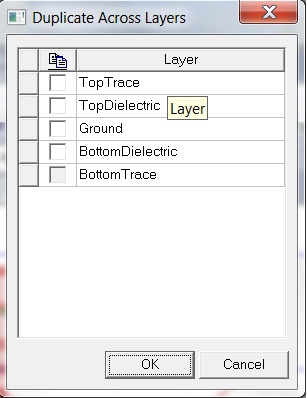
- Only stackup layers are listed as valid target layers. Locked layers are not eligible as target layers and are unavailable. If all items are on the same layer, that layer is also unavailable.
- Right-click the layer selection grid to select from all signal, ground, or dielectric layers.
- After you select target layers and click OK, the eligible items are duplicated to the layer(s) you select. All duplicated items remain selected if they are on layers that are selectable and visible. Selected items that are not eligible for duplication is listed in the Message Manager window.