Disabling or Enabling a Frequency Sweep
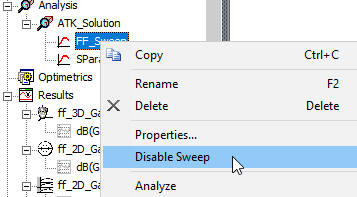
You can activate or deactivate a sweep definition. Disabled sweeps has an “empty graph” icon, and are not analyzed until enabled. To deactivate a sweep definition without deleting it:
- Expand the tree hierarchy under the Analysis icon in the Project Tree.
- Expand the tree hierarchy under the icon for the analysis setup that includes the sweep.
- Right-click the icon for the sweep definition and select Disable Sweep Analysis. (To reactivate the sweep, right-click again and select Enable Sweep Analysis.)
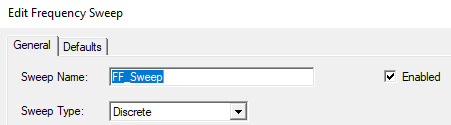
Also deactivate a sweep by right-clicking and selecting Properties to open the Edit Properties window. In the upper-right corner of the Edit Properties window, uncheck the Enabled area. Then click OK to apply the change. (To reactivate the sweep, re-open the Edit Properties window and check the Enabled area. Then click OK.)