
Dielectric Simplification (Merging)
Dielectric simplification allows you to select one or more groups of continuous dielectric layers, then merge each group into one dielectric layer.
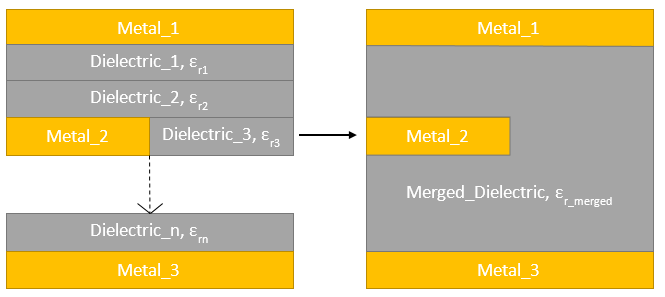
During this process, a relative permittivity for the new merged layer is calculated using one of the three methods in the following table. Select the chosen method viathe Merge Dielectrics window.
|
Method |
Equation |
|
Weighted Capacitance |
|
|
Kraszewski Method |
|
|
Weighted Average |
|

 .
.
By combining numerous thin dielectric layers into one layer, the number of meshing elements is reduced with minimal decrease in computation accuracy. Thus, a comparable analysis can be performed in less time. Dielectric merging can be performed through either the user interface or the EDB API.
To perform dielectric merging:
- Open the Edit Layers window.
- Select one or more groups of layers.
- Right-click on a group of layers, then select Merge Dielectrics.
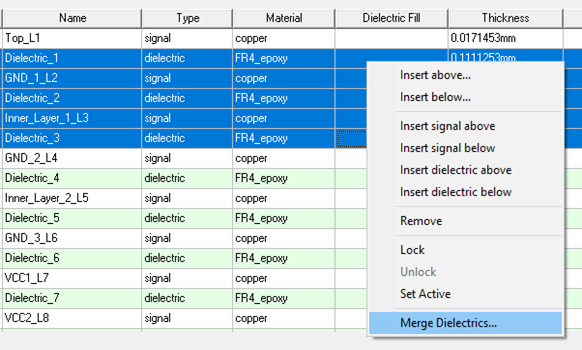
- Enter the chosen parameters in the Merge Dielectrics window.
Note:
When multiple dielectric ranges are selected, multiple Merge Dielectrics windows appear. The window titles include the range of layers affected that window's merge operation.
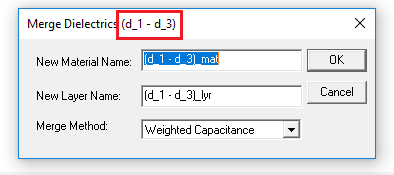
- Click OK to merge the dielectrics.