
Electronics Desktop can associate a predefined stackup, (also called the substrate or technology), with each design. A technology includes stackup layers’ material properties, units, thickness, elevation, and roughness data, and associated substrate definitions for Nexxim Circuit or Planar EM simulation. The current technology or substrate is applied to components defined for a design or copied in from other designs. Complete these steps to enable the Choose Technology window and then select a technology.
-
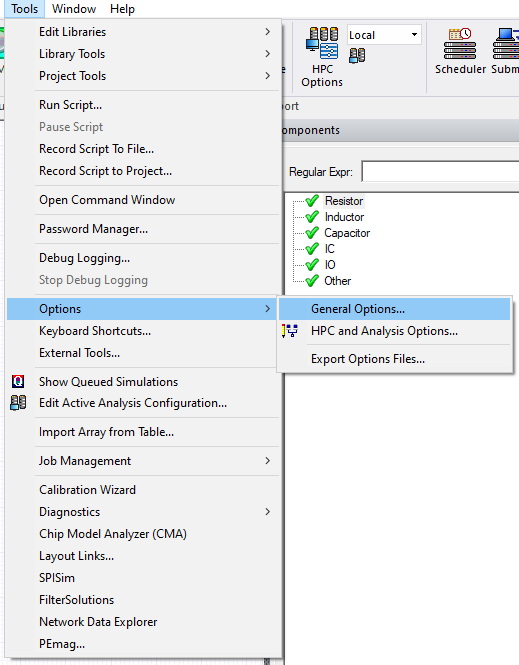
From the Tools menu, select Options > General Options to open the Options window.
-
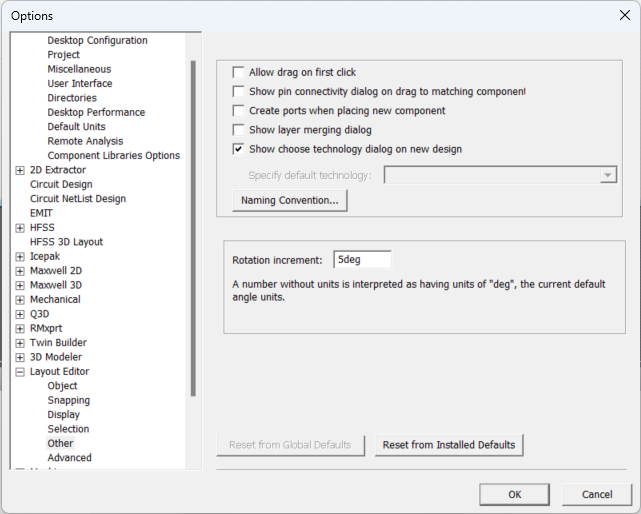
Expand Layout Editor and select Other. Then check the Show choose technology dialog on new design box.
-
Click OK to close the Options window.
-
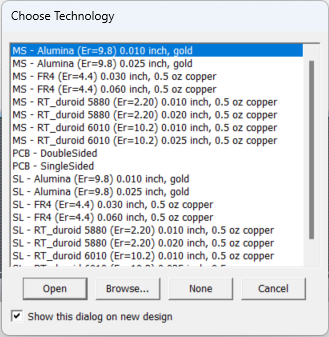
Insert a new design HFSS 3D Layout design in a project to open the Choose Technology window.
-
Select the stackup technology on which the design are based. Select a technology, then proceed to design editing without selecting a technology, or abort adding a design to the project.
-
From the Choose Technology window, do one of the following:
- To use one of Desktop’s predefined technologies, select its entry in the list, then click Open.
- To use an existing technology not shown in the list, click Browse. Through the explorer window, browse to and select the Ansys Technology .asty file, then click Open.
- To add a design without choosing a technology, click None.
- To select not to add a new design to the project, click Cancel.
-
When you specify a technology or click None, a blank design of the type you selected opens for editing
All components that can use a substrate technology automatically assigns the technology you select for the design. This includes components added on the Components window and components pasted in from other designs. If no technology has been selected, no substrate is assigned to components.
As a result, when a schematic from a project that has a substrate definition is copied into another project, the pasted schematic uses the substrate that is defined for the second project, if a substrate has been defined. If no substrate has been defined for the second project, the schematic elements are copied in with no substrate (“SUB” property is empty).
To import a technology from a technology file, refer to Adding a Technology File to a Design (IC Mode only).