
Introduction
This document is intended as supplementary material to HFSS for beginners and advanced users. It includes instructions to create, simulate, and analyze a dielectric resonator antenna.
What You Will Learn
By following the steps in this guide, you will learn how to perform the following HFSS tasks in Ansys Electronics Desktop:
- Draw a geometric model
- Modify a model’s design parameters
- Assign variables to a model’s design parameters
- Specify solution settings for a design
- Validate a design’s setup
- Run an HFSS simulation
- Create a 2D X-Y plot of S-parameter results
- Create a field overlay plot of results
- Create a phase animation of results
Sample Project - Dielectric Resonator Antenna (DRA)
This antenna is cavity-backed with an annular-slot-fed hemispherical dielectric resonator. The antenna feed is achieved by coaxial excitation across one side of an annular slot between the cavity and the DRA dielectric. For this project, the engineering focus is on the behavior of the antenna itself, not its feed. Therefore, the model will feed with a lumped port across an annular slot. The design’s operating frequency is 3.5 GHz.
This project is also described and analyzed in the following IEEE publication:
- Leung, K.W., So, K.K., “Annular-slot-Excited Dielectric Resonator Antenna with a Backing Cavity,” IEEE Transactions on Antennas and Propagation, August 2002.
A half-symmetry model of a Dielectric Resonator Antenna (DRA), designed in Ansys Electronics Desktop as an HFSS design, is illustrated in the following figure:
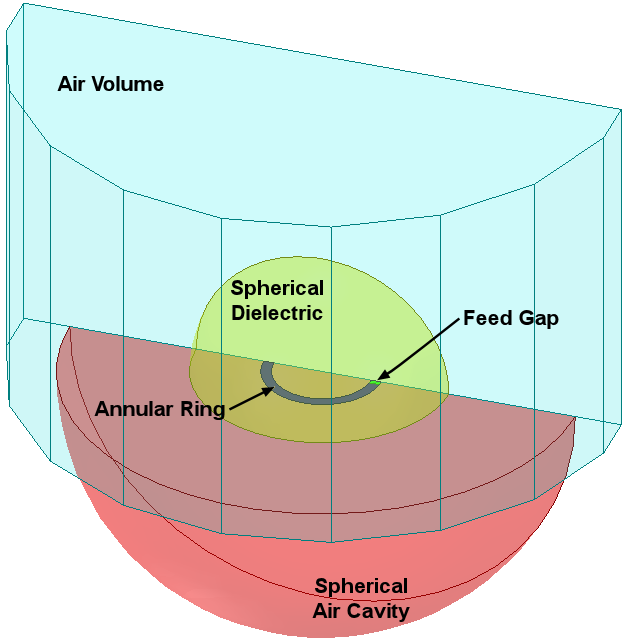
Figure 1-1: Sample Project - Dielectric Resonator Antenna (DRA)